2025-08-11
🤿 Diving Deeper Into Spring Boot (2)
After exploring the core Spring Framework, I turned my focus to Spring Boot. While studying, I dug into its auto-configuration, dependency management, configuration options, JPA integration, security, Actuator, and more. These are my notes from the journey. Happy reading 🙂
- 1. Spring Boot Core Features
- 2. Starting a Spring Boot Project
- 2.1. Spring Initializr
- 2.2. spring-boot-maven-plugin Usage
- 2.3. Basic Annotations
- 2.4. Application Startup Hooks
- 3. Dependency Management
- 4. Configuring Spring Boot
- 5. Externalized Configuration
- 6. Spring Boot and Spring Data JPA
- 6.1. Spring Data JPA Auto-Configuration
- 6.2. JPA Repository Interfaces
- 6.2.1. Derived Query Methods
- 6.2.2. @Query Annotation
- 6.3. Entity Configuration
- 6.3.1. Entity Scanning
- 6.3.2. Custom Column Mapping
- 6.4. Criteria Queries
- 6.5. Specifications
- 6.6. SQL and JPA-Based Database Initialization
- 6.7. Flyway with Spring Boot
- 6.7.1. Migration Lifecycle
- 6.7.2. Baseline Existing Databases
- 6.7.3. Best Practices
- 6.7.4. Example
- 7. Spring Boot and Web Applications
- 8. Securing REST Application with Spring Security
- 8.1. Overview
- 8.1.1. Java EE Security
- 8.1.2. Spring Security
- 8.2. Spring Security for HTTP-Based Applications
- 8.3. Authentication
- 8.3.1. Basic Terms
- 8.3.2. Flow Examples
- 8.4. Authorization
- 8.1. Overview
- 9. Actuator
- 9.1. Basic Terms
- 9.2. Using HTTP endpoints vs JMX
- 9.3. Observability Flow Example
- 9.4. Methods of Instrumenting Metrics
- 9.5. Hierarchical vs. Dimensional Metrics
- 9.6. Instrumenting Metrics Examples
- 9.6.1. Using Built-in annotations
- 9.6.2. Manually using meters
- 9.6.3. Custom AOP approach
- 9.7. The HealthIndicator System
- 9.7.1. Custom Health Check Example
- 9.7.2. Health Indicator Groups
- 9.8. Securing Actuator
- 9.9. Auditing
- 9.9.1. Basic Terms
- 9.9.2. Configuration
- 9.9.3. Querying Audit Logs
- 9.9.4. Custom Events
- 9.9.5. Persistence
- 10. Logging in Spring Boot
1. Spring Boot Core Features
- Spring Boot is opinionated as it provides:
- Default configurations.
- Pre-selected libraries to simplify development.
- Main Features:
- Includes embedded servers (
Tomcat,Jetty) by default. - Automatically exposes app metrics (memory, CPU, requests) via
Micrometer. - Provides
/actuator/healthto monitor app status (e.g., database, disk space) in real-time. - Supports external configuration via properties files.
- Uses starters to ensure compatible library versions.
- Includes embedded servers (
2. Starting a Spring Boot Project
2.1. Spring Initializr:
- Simplifies the creation of Spring Boot projects by allowing selecting dependencies, build tools (Maven/Gradle), and configuration settings.
- Can be used through:
- Browser: https://start.spring.io
- IDEs: Most modern IDEs integrate with Spring Initializr..
- Command line:
curl https://start.spring.io/starter.zip \
  -d dependencies=web,data-jpa \
  -d javaVersion=17 \
  -d type=maven-project \
  -d bootVersion=3.4.4 \
  -d groupId=com.aziz \
  -d artifactId=hello \
  -output o.zip && unzip o.zip -d . && rm o.zip
2.2. The usage of the spring-boot-maven-plugin:
- Helps building and running Spring Boot applications using Maven (e.g., via
mvn spring-boot:run).. - Generates the following JAR files in the
target/directory:my-app.jar: An executable (fat) JAR that includes all compiled classes and runtime dependencies.my-app.jar.original: The original JAR produced by Maven before repackaging. It contains only your application's compiled classes.
2.3. Basic Annotations:
@SpringBootConfiguration: A specialized version of@Configurationused specifically for Spring Boot configuration classes.@EnableAutoConfiguration: Automatically configures Spring application based on dependencies in the classpath.
@SpringBootConfiguration
@EnableAutoConfiguration
@ComponentScan(basePackages = "com.example.myapp") // Optional: scans for components in specified package
public class MyApplication {}

// ------- easier ------- //
@SpringBootApplication
public class MyApplication {}
2.4. Application Startup Hooks:
Run code after the application context is loaded.
CommandLineRunner: Accepts rawString... argsfrom the command line.
// java -jar app.jar --import
@Component
public class MyCommandLineRunner implements CommandLineRunner {
    @Override
    public void run(String... args) {
        if (args.length > 0 && args[0].equals("--import")) {
            System.out.println("Importing data from CSV...");
        }
    }
}
ApplicationRunner: UsesApplicationArgumentsfor easier access to options and values.
// java -jar app.jar --import=data.csv
@Component
public class MyApplicationRunner implements ApplicationRunner {
    @Override
    public void run(ApplicationArguments args) {
        if (args.containsOption("import")) {
            String path = args.getOptionValues("import").get(0);
            System.out.println("Importing from: " + path);
        }
    }
}
- Both runners execute after the application starts, and can be ordered using the
@Orderannotation when multiple runners exist.
3. Dependency Management
Spring Boot simplifies dependency management through several mechanisms.
3.1. Spring Boot Starters:
- Starter POMs that bundle commonly used dependencies together.
- Each starter includes all needed dependencies for a specific functionality.
- Examples:
spring-boot-starter: Core starter that includes auto-configuration support and logging.spring-boot-starter-web: Starter for web applications (includes Spring MVC, Tomcat).spring-boot-starter-data-jpa: Starter for working with JPA and Hibernate for database access.spring-boot-starter-security: Starter for authentication and authorization.spring-boot-starter-test: Starter for testing (JUnit, Mockito, Spring Test).spring-boot-starter-batch: Starter for batch processing.spring-boot-starter-mail: Starter for sending emails with JavaMailSender.
- Spring Boot auto-selects the
ApplicationContextimplementation based on the included starters.
3.2. Spring Boot Parent POM Inheritance:
spring-boot-starter-parent: Provides default Java version, default configurations, and contains a dependencyManagement section to manage and control versions of dependencies.
<!------------ SPRING BOOT PARENT POM ------------>
<dependencyManagement>
    <dependencies>
        <dependency>
            <groupId>org.hibernate</groupId>
            <artifactId>hibernate-core</artifactId>
            <version>5.6.7.Final</version>
        </dependency>
    </dependencies>
</dependencyManagement>

<!------------ PROJECT POM ------------>
<parent>
    <groupId>org.springframework.boot</groupId>
    <artifactId>spring-boot-starter-parent</artifactId>
</parent>
<dependencies>
    <dependency>
        <groupId>org.springframework.boot</groupId>
        <artifactId>spring-boot-starter-web</artifactId> <!-- No version needed -->
    </dependency>
</dependencies>
4. Configuring Spring Boot
4.1. Auto-Configuration:
- Spring Boot simplifies the setup of the application by automatically configuring necessary beans based on the libraries in the classpath.
- Example: if it finds
spring-boot-starter-data-jpa, it configures a JPA entity manager. - Auto Configuration classes can be found in the
spring-boot-autoconfiguremodule.
4.2. Conditional Configuration:
- Auto-Configuration classes use conditions to determine whether certain beans should be created.
- Examples:
@ConditionalOnClass("com.example.Foo"): Applies if the class is present on the classpath.@ConditionalOnMissingClass("com.example.Foo"): If class missing.@ConditionalOnBean(MyService.class): Applies if the specified bean exists in the context.@ConditionalOnMissingBean(MyService.class): If bean absent.@ConditionalOnProperty(name = "feature.enabled", havingValue = "true"): Applies if the property exists and matches the value.@ConditionalOnExpression("#{environment['feature.enabled'] == 'true'}"): Applies if the SpEL expression evaluates to true.@ConditionalOnResource("classpath:/myfile.yml"): Applies if the resource exists on the classpath.@ConditionalOnJava(JavaVersion.SEVENTEEN): Applies if running on the specified Java version.
@Configuration
@ConditionalOnClass(DataSource.class) // Only applies if DataSource is on the classpath
@EnableConfigurationProperties(DataSourceProperties.class) // Binds DataSource properties
public class DataSourceAutoConfiguration {
    @Bean
    @ConditionalOnMissingBean // Only creates this bean if it does not exist
    public DataSource dataSource(DataSourceProperties properties) {
        return properties.initializeDataSourceBuilder().build();
    }
}
@Profileis a conditional annotation that allows to define beans that only be loaded in specific environments.
@Profile("development")
@Bean
public DataSource dataSource() {}
4.3. Customizing Spring Boot Behavior:
Spring Boot provides multiple ways to override its defaults.
4.3.1. Override Behavior via Properties:
logging.level.com.example: DEBUG
4.3.2. Overrides Auto-Configured Beans:
- Spring Boot Auto Configure a default
SecurityFilterChain:
@AutoConfiguration
@ConditionalOnClass(SecurityFilterChain.class)
public class SecurityAutoConfiguration {
    @ConditionalOnMissingBean(SecurityFilterChain.class)
    @Bean
    SecurityFilterChain defaultSecurityFilterChain(/* ... */) { /* ... */ }
}

@Bean
SecurityFilterChain defaultSecurityFilterChain(/* ... */) { /* ... */ }
- And that can be overridden by defining a
SecurityFilterChain:
@Configuration
public class SecurityConfig {
    @Bean
    SecurityFilterChain securityFilterChain(/* ... */) { /* ... */ }
}
4.3.3. Disabling Specific Auto-Configuration:
@SpringBootApplication(exclude = {SecurityAutoConfiguration.class})
public class MyApplication {}
// OR
spring.autoconfigure.exclude: org.springframework.boot.autoconfigure.security.servlet.SecurityAutoConfiguration
4.3.4. Managing Dependencies and Versions in pom.xml:
<!-- override the Spring Boot version -->
<properties>
    <spring-boot.version>2.6.4</spring-boot.version>
</properties>

<!-- override the used Servlet container -->
<dependencies>
    <dependency>
        <groupId>org.springframework.boot</groupId>
        <artifactId>spring-boot-starter-web</artifactId>
        <exclusions>
            <exclusion>
                <groupId>org.springframework.boot</groupId>
                <artifactId>spring-boot-starter-tomcat</artifactId> <!-- Exclude Tomcat -->
            </exclusion>
        </exclusions>
    </dependency>

    <dependency>
        <groupId>org.springframework.boot</groupId>
        <artifactId>spring-boot-starter-jetty</artifactId> <!-- Replaces Tomcat -->
    </dependency>
</dependencies>
5. Externalized Configuration
Externalized configuration allows separation of environment-specific settings from the application code.
5.1. Configuration Property Sources:
Spring Boot loads configuration properties in the following order (highest to lowest precedence):
- Command-line arguments (
--server.port=8081). - Environment variables.
- Java system properties (
-Dserver.port=8082), - Profile-specific files:
application-{profile}.propertiesor.yml. - Default properties file:
application.propertiesor.ymlinsrc/main/resources.
5.2. Locations of application.properties:
Spring Boot checks for application.properties or .yml in the following locations (Highest → Lowest) Priority:
./config/application.properties: (Externalconfigdirectory next to the JAR)../application.properties: (External file in same directory as the JAR).classpath:/config/application.properties: (configdirectory inside the JAR).classpath:/application.properties(Root of classpath inside the JAR).
Profile-specific variants (e.g.,
application-prod.yml) are checked at each level after the base file.
5.3. Type-Safe Configuration (@ConfigurationProperties):
- It binds related configuration properties to a bean in a type-safe way.
/**
mail.host=10.10.10.10
mail.port=465
**/

@Data
@Component
@ConfigurationProperties(prefix = "mail")
public class MailConfig {
    private String host;
    private int port;
}
6. Spring Boot and Spring Data JPA
6.1. Spring Data JPA Auto-Configuration:
When spring-boot-starter-data-jpa is on the classpath, Spring Boot automatically configures the following components:
DataSourcebean:- Database connection properties are read from
application.properties. - If a supported database driver is on the classpath, it will be used.
- If no properties are defined, an embedded database like H2 is used by default.
- Database connection properties are read from
EntityManagerFactorybean:- Provided by Hibernate by default, based on the configured
DataSource. - All
@Entityclasses on the classpath are automatically scanned.
- Provided by Hibernate by default, based on the configured
JpaTransactionManager:- Manages transactions for the JPA persistence layer.
- Supports declarative transaction management using
@Transactional.
JPA Repositories:- Can be Activated by extending
JpaRepository.
- Can be Activated by extending
6.2. JPA Repository Interfaces:
- Auto-generated Implementations:
- After creating a repository interface. Spring Data JPA automatically generates a proxy repository class at runtime.
- Available base repositories for extending:
CrudRepository<T, ID>: Basic CRUD operations.PagingAndSortingRepository<T, ID>: ExtendsCrudRepositorywith methods for pagination and sorting.JpaRepository<T, ID>: ExtendsPagingAndSortingRepositorywith JPA-specific operations like batch updates andflush().Repository<T, ID>: Marker interface for custom implementations.JpaSpecificationExecutor<T>: Supports Criteria API queries.ElasticsearchRepository<T, ID>: Adds search capabilities for Elasticsearch.
6.2.1. Derived Query Methods:
- Methods in repository interfaces follow naming conventions to auto-generate queries at runtime.
- They use Spring's proxy mechanism to handle those calls.
/*
 * [Action][Limit][Distinct]By[Property][Condition][LogicalOperator]...[OrderBy...]
 *
 * Segments:
 * ─────────
 * [Action]           → find == read == get == query == search == stream // Required
 * [Limit]            → First == Top | Top3 == First3                    // Optional
 * [Distinct]         → Distinct                                         // Optional
 * By                 → (literal)
 * [Property]         → Entity field names (can be nested)
 * [Condition]        → Is | Not | GreaterThan | LessThanEqual | Between | Like | Containing | ...
 * [LogicalOperator]  → And | Or                                         // Optional chaining
 * [OrderBy...]       → OrderByFieldAsc | OrderByFieldDesc               // Optional sorting
 */
public interface UserRepository extends JpaRepository<User, Long> {

    // ────── [Action] ──────
    List<User> findByUsername(String username);
    List<User> readByEmail(String email);
    List<User> getByPhoneNumber(String phone);

    // ────── [Limit] ──────
    User findTopByOrderByCreatedAtDesc();                     // LIMIT 1 (latest)
    List<User> findTop3ByStatus(String status);               // Top 3
    List<User> findFirst5ByRole(String role);                 // First 5

    // ────── [Distinct] ──────
    List<User> findDistinctByLastName(String lastName);       // SELECT DISTINCT
    List<User> findTop5DistinctByAgeGreaterThan(int age);     // DISTINCT + LIMIT

    // ────── [Boolean Field] ──────
    List<User> findByIsActiveTrue();                          // isActive == true
    List<User> findByIsActiveFalse();                         // isActive == false
    List<User> findByEnabledIs(Boolean enabled);              // Boolean = ?
    List<User> findByEnabled(Boolean enabled);                // same as above

    // ────── [Null Checks] ──────
    List<User> findByEmailIsNull();
    List<User> findByEmailIsNotNull();

    // ────── [Equality / Is] ──────
    List<User> findByUsernameIs(String username);             // Same as findByUsername

    // ────── [Not Equal / Negation] ──────
    List<User> findByStatusNot(String status);                // status != ?

    // ────── [Comparison: Numbers / Dates] ──────
    List<User> findByAgeGreaterThan(int age);                 // age > ?
    List<User> findByAgeGreaterThanEqual(int age);            // age >= ?
    List<User> findByCreatedAtAfter(LocalDateTime time);      // created_at > ?
    List<User> findByCreatedAtBefore(LocalDateTime time);     // created_at < ?
    List<User> findByAgeBetween(int min, int max);            // age BETWEEN

    // ────── [Text / Pattern Matching] ──────
    List<User> findByEmailLike(String pattern);               // LIKE '%abc%'
    List<User> findByUsernameContaining(String part);         // LIKE '%part%'
    List<User> findByUsernameNotContaining(String part);      // NOT LIKE
    List<User> findByFirstNameStartingWith(String prefix);    // LIKE 'prefix%'
    List<User> findByLastNameEndingWith(String suffix);       // LIKE '%suffix'
    List<User> findByUsernameIgnoreCase(String username);     // Case-insensitive

    // ────── [IN / NOT IN] ──────
    List<User> findByRoleIn(List<String> roles);              // role IN (...)
    List<User> findByIdNotIn(List<Long> ids);                 // id NOT IN (...)

    // ────── [Logical Operators] ──────
    List<User> findByUsernameAndEmail(String u, String e);
    List<User> findByStatusOrRole(String status, String role);

    // ────── [Nested / Embedded Properties] ──────
    List<User> findByCompany_Name(String name);               // join on entity
    List<User> findByAddress_City(String city);               // embedded/nested

    // ────── [Collection Fields] ──────
    List<User> findByTagsContaining(String tag);              // collection contains

    // ────── [Ordering / Sorting] ──────
    List<User> findByCountryOrderByAgeAsc(String country);
    List<User> findByDepartmentOrderBySalaryDesc(String dept);
    List<User> findTop3ByStatusOrderByCreatedAtDesc(String status);
    User findFirstByOrderByUsernameAsc();                     // Top 1 alphabetically
}
- Additional actions:
count,delete == remove,exists.
public interface OrderRepository extends JpaRepository<Order, Long> {

    // Count orders in date range
    long countByOrderDateBetween(LocalDate start, LocalDate end);

    // Delete unpaid expired orders
    long deleteByStatusAndPaymentDateIsNull(String status);

    // Check if high-value order exists
    boolean existsByTotalAmountGreaterThan(BigDecimal amount);
}
6.2.2. The @Query Annotation:
- Enables custom querying to native SQL queries or JPQL queries.
// **Native SQL**
@Repository
public interface UserRepository extends CrudRepository<User, Long> {
    @Query(value = "SELECT * FROM users WHERE last_name = ?1", nativeQuery = true)
    List<User> findByLastNameNative(String lastName);

    @Query(value = "SELECT COUNT(*) FROM users", nativeQuery = true)
    Long countUsers();

    @Query(value = "SELECT * FROM users WHERE age BETWEEN ?1 AND ?2", nativeQuery = true)
    List<User> findUsersBetweenAges(int startAge, int endAge);
}

// **JPQL Queries**: offers a level of abstraction over native SQL.
@Repository
public interface UserRepository extends CrudRepository<User, Long> {
    @Query("SELECT u FROM User u WHERE u.lastName = :lastName")
    List<User> findByLastName(@Param("lastName") String lastName);

      @Query("SELECT u FROM User u JOIN u.orders o WHERE u.lastName = :lastName")
    List<User> findUsersWithOrdersByLastName(@Param("lastName") String lastName);

      @Query("SELECT u, SUM(o.amount) AS totalAmount " +
           "FROM User u JOIN u.orders o " +
           "GROUP BY u.id " +
           "HAVING totalAmount > 1000")
    List<Object[]> findUsersWithTotalOrderAmountAbove1000();
}
6.3. Entity Configuration:
6.3.1. Entity Scanning:
- Spring Boot scans the main application package and sub-packages by default. Use
@EntityScanto override. - Spring Boot scans for
@Entityclasses in the application’s base package by default. - Use
@EntityScan(basePackages = "com.example.entities")to specify the location.
6.3.2. Custom Column Mapping:
@Entity  // Marks this class as a JPA entity (will be mapped to a database table)
public class User {

    @Embedded  // An embeddable component (fields will be included directly in the User's table rather than a separate table)
    @AttributeOverrides({
        @AttributeOverride(name = "street", column = @Column(name = "user_street")),
        @AttributeOverride(name = "zipCode", column = @Column(name = "postal_code"))
    })
    private Address address;  // Embedded Address object with customized column mappings
}```
### <a id="criteria-queries"></a> 6.4. Criteria Queries:
- A `CriteriaBuilder` is used to build `CriteriaQuery` objects which is used to perform a query.
- The `Predicate` class is part of the Criteria API and is used to construct where clauses.
```java
public class UserCriteriaQuery {
    public List<User> findUsers(String name, Integer age) {
        CriteriaBuilder criteriaBuilder = entityManager.getCriteriaBuilder();

        CriteriaQuery<User> criteriaQuery = criteriaBuilder.createQuery(User.class);

        // DEFINE THE ROOT ENTITY (FROM CLAUSE)
        Root<User> userRoot = criteriaQuery.from(User.class);

        // INITIALIZE PREDICATE WITH CONJUNCTION (WHERE 1=1 EQUIVALENT). SERVES AS A BASE TO ADD MORE CONDITIONS
        Predicate predicate = criteriaBuilder.conjunction();

        // ADDING CONDITIONS
        predicate = criteriaBuilder.and(
            predicate,
            criteriaBuilder.equal(userRoot.get("name"), name)
        );
        predicate = criteriaBuilder.and(
            predicate,
            criteriaBuilder.greaterThan(userRoot.get("age"), age)
        );

        // APPLY THE CONSTRUCTED PREDICATE AS WHERE CLAUSE
        criteriaQuery.where(predicate);

        // ADDING MORE CLAUSES
        criteriaQuery.orderBy(criteriaBuilder.asc(userRoot.get("name"))); // ORDER BY
        criteriaQuery.groupBy(userRoot.get("email"));  // GROUP BY

        return entityManager.createQuery(criteriaQuery).getResultList();
    }
}
6.5. Specifications:
Defines reusable Predicate components..
class UserSpecification {
    public static Specification<User> hasName(String name) {
        return (root, query, criteriaBuilder) ->
            name == null ? null : criteriaBuilder.equal(root.get("name"), name);
    }

    public static Specification<User> hasEmail(String email) {
        return (root, query, criteriaBuilder) ->
            email == null ? null : criteriaBuilder.equal(root.get("email"), email);
    }
}

interface UserRepository extends CrudRepository<User, Long>, JpaSpecificationExecutor<User> {}

@Service
class UserService {
    @Autowired
    private UserRepository userRepository;

    public List<User> findUsers(String name, String email, Integer age) {
        return userRepository.findAll(
            Specification
              .where(UserSpecification.hasName(name))
              .and(UserSpecification.hasEmail(email))
        );
    }
}
6.6. SQL and JPA-Based Database Initialization
- Spring Boot supports two main approaches for initializing a database at application startup:
- SQL Script Initialization:
- Automatically run
schema.sql(for schema) anddata.sql(for seed data) at startup. - Spring Boot will load
schema-${platform}.sqlanddata-${platform}.sqlfiles if present, where${platform}is the value ofspring.datasource.platform(e.g.,h2,mysql,postgresql) - Custom locations can be specified:
- Automatically run
spring.sql.init.schema-locations=classpath:/db/schema.sql
spring.sql.init.data-locations=classpath:/db/data.sql
- JPA/Hibernate Schema Generation:
- When using Spring Data JPA, Hibernate can automatically create or validate the schema based on
@Entitymappings.none: No action.validate: Validate schema matches entities.update: Alter DB schema to match entities.create: Drop and recreate schema.create-drop: Same ascreatebut drops schema on shutdown.
- When using Spring Data JPA, Hibernate can automatically create or validate the schema based on
spring.jpa.hibernate.ddl-auto=create # or update, validate, none, etc.
6.7. Flyway with Spring Boot:
- Manage database schema changes in Spring applications.
- Flyway auto-configuration is enabled. as soon as the
flyway-coredependency is on the classpath. It scansdb/migrationby default. - Flyway migrations are applied during integration testing with
@SpringBootTest.
6.7.1. Migration Lifecycle:
- On startup, Spring runs Flyway migrations before Hibernate initializes.
- Flyway checks the
flyway_schema_historytable to decide which migrations to apply. - If the DB is empty, Flyway creates this table and runs all migrations.
- If the DB has existing migrations, Flyway only applies new ones.
6.7.2. Baseline Existing Databases:
For databases that already exist before Flyway:
- Flyway creates
flyway_schema_historytable. - Treats current schema as "version 1".
- Applies only new migrations
V2+,
spring.flyway.baseline-on-migrate=true  # Creates baseline if no schema history exists
spring.flyway.baseline-version=1       # Starts migration tracking from version 1
6.7.3. Best Practices:
- Never modify applied migrations. Always roll forward and create new files.
- Disable Hibernate
auto-DDL.
spring.jpa.hibernate.ddl-auto=validate
- Generate the SQL that would be executed.
mvn flyway:migrate -Dflyway.dryRunOutput=/tmp/planned_migrations.sql
6.7.4. Example:
-- src/main/resources/db/migration/V1__Create_customers.sql
CREATE TABLE customers (
    id SERIAL PRIMARY KEY,
    name VARCHAR(100) NOT NULL
);
mvn flyway:migrate
#  Successfully applied 1 migration (execution time 00:00.123s)

mvn flyway:info
#  +-----------+---------+---------------------+------+---------------------+---------+
#  | Version   | State   | Description         | Type | Installed On        | Script  |
#  +-----------+---------+---------------------+------+---------------------+---------+
#  | 1         | Success | Create customers    | SQL  | 2024-03-20 10:00:00 | V1__... |
#  +-----------+---------+---------------------+------+---------------------+---------+
-- src/main/resources/db/migration/V2__Add_email_column.sql
ALTER TABLE customers ADD COLUMN email VARCHAR(255) UNIQUE;
mvn flyway:migrate
#  Successfully applied 1 migration (V2), now at version 2
7. Spring Boot and Web Applications
7.1. Spring MVC Auto-Configuration:
When spring-boot-starter-web is on the classpath, Spring Boot automatically configures the following components:
Embedded Web Server: Includes Tomcat, Jetty, or Undertow.DispatcherServlet: Centralservletthat routes incoming HTTP requests to appropriate controller methods.Jackson JSON support: Automatically converts Java objects to/from JSON.Static Resources: Serves static content from/static,/public,/resources, or/META-INF/resources.
7.2. HTTP Request Lifecycle in a Spring MVC:
- A client sends a request.
- The
DispatcherServletintercepts and maps the request to a controller. - The controller processes the request and populates a Model.
- The
DispatcherServletresolves the view and renders the response. - The response is sent back to the client.
DispatcherServlet:
- Acts as the front controller for handling incoming web requests.
- Maps incoming requests to specific controller methods based on URL patterns and HTTP methods using annotations like
@RequestMapping.
7.3. Content Negotiation & Message Conversion:
Spring Boot auto-configures HTTP content negotiation to support multiple response formats such as JSON, XML, and plain text.
- The client sends a request with an
Acceptheader (e.g.,Accept: application/json,application/xml). - The
DispatcherServletintercepts the request and maps it to the appropriate controller. - Before executing the controller method, Spring evaluates the
Acceptheader and selects a suitableHttpMessageConverter:MappingJackson2HttpMessageConverter: handlesapplication/json.Jaxb2RootElementHttpMessageConverter: handlesapplication/xml.StringHttpMessageConverter: handlestext/plain.MultipartHttpMessageConverter: handles requests withContent-Type: multipart/form-data(typically used for file uploads).
7.4. Developer Tools (spring-boot-devtools):
- Enhances the development productivity through:
- Automatic restarts.
- Disabling template and static content caching.
- Automatically disabled when the application is packaged as a fat JAR.
7.5. RESTful API Support:
- REST (Representational State Transfer) is an architectural style for designing web services.
- It uses HTTP methods (
GET,POST,PUT,DELETE) to interact with resources identified byURIs. @RequestBody: binds the HTTP request body to a Java object.@RestController: combines@Controllerand@ResponseBody.
7.5.1. Example:
@RestController
@RequestMapping("/api/items")
public class ItemController {

    @Autowired
    private ItemService itemService;

    @GetMapping
    public List<Item> getAllItems() {
        return itemService.getAllItems();
    }

    @GetMapping("/{id}")
    public ResponseEntity<Item> getItemById(@PathVariable Long id) {
        Item item = itemService.getItemById(id);
        return item != null ? ResponseEntity.ok(item) : ResponseEntity.notFound().build();
    }

    @PostMapping
    public ResponseEntity<Item> createItem(@RequestBody Item item) {
        Item createdItem = itemService.saveItem(item);
        URI location = ServletUriComponentsBuilder.fromCurrentRequest()
                .path("/{id}")
                .buildAndExpand(createdItem.getId())
                .toUri();
        return ResponseEntity.created(location).body(createdItem);
    }
}
7.6. HTTP Client (RestTemplate):
- A blocking, synchronous client for making HTTP requests to interact with remote APIs.
import org.springframework.http.*;
import org.springframework.stereotype.Service;
import org.springframework.web.client.RequestCallback;
import org.springframework.web.client.ResponseExtractor;
import org.springframework.web.client.RestTemplate;

@Service
public class ItemService {

    private final RestTemplate restTemplate = new RestTemplate();
    private final String baseUrl = "https://jsonplaceholder.typicode.com/items";

    public void start() {
        // 1. GET: getForObject()
        Item item = this.restTemplate.getForObject(baseUrl + "/1", Item.class);

        // 2. GET: getForEntity()
        ResponseEntity<Item> getResponse = this.restTemplate.getForEntity(baseUrl + "/1", Item.class);
        Item result = getResponse.getBody();

        // 3. POST: postForObject()
        Item newItem = new Item(null, "Post Title", "Post Body", 1);
        Item createdItem = restTemplate.postForObject(baseUrl, newItem, Item.class);

        // 4. POST: postForEntity()
        ResponseEntity<Item> postResponse = this.restTemplate.postForEntity(baseUrl, newItem, Item.class);
        System.out.println("POST Status=" + postResponse.getStatusCode());
        Item result = getResponse.getBody();

        // 5. PUT: put()
        Item updatedItem = new Item(1, "Updated Title", "Updated Body", 1);
        this.restTemplate.put(baseUrl + "/1", updatedItem);

        // 6. PUT (alternative): exchange()
        HttpHeaders headers = new HttpHeaders();
        HttpEntity<Item> putEntity = new HttpEntity<>(updatedItem, headers);
        ResponseEntity<Item> putResponse = restTemplate.exchange(baseUrl + "/1", HttpMethod.PUT, putEntity, Item.class);
        Item updated = putResponse.getBody();

        // 7. DELETE: delete()
        this.restTemplate.delete(baseUrl + "/1");
    }
}
8. Securing REST Application with Spring Security
8.1. Overview:
- Principal: represents the current user or entity.
- Authentication: verifying a user’s identity.
- Authorization: checking if an authenticated user has permission to perform an action.
- Secured Resource: part of the app protected by authorization (e.g., endpoints, methods).
8.1.1. Java EE Security:
- Suitable for traditional Java EE applications running in managed containers.
- Mostly static configuration. Define roles and constraints in
web.xml.
8.1.2. Spring Security:
- Ideal for modern Spring Boot applications.
- Better support for REST APIs,
OAuth2, micro-services, and modern security standards. - Works with:
- HTTP-based applications – secured using
HttpSecurityand filters (most common). - CLI and batch job applications – secured using method-level security. activated by
@EnableMethodSecurity. - WebSocket-based applications – secured via WebSocket message interceptors.
- HTTP-based applications – secured using
8.2. Spring Security for HTTP-Based Applications:
8.2.1. Basic Terms (Java EE Security Concepts):
Servlet Filters: intercept HTTP requests for tasks like authentication, authorization, or logging.FilterChain: a Java EE interface for managing the order and flow of filters.
8.2.2. Spring Security Request Processing Flow:
- Servlet Container receives a request.
DelegatingFilterProxyis invoked (aServlet Filterregistered in theweb.xmlor via Java Config with name=springSecurityFilterChain).- It looks up the Spring bean
springSecurityFilterChainwhich is an instance ofFilterChainProxy.Filter delegate = getFilterBean(context); // finds the bean named "springSecurityFilterChain"delegate.doFilter(request, response, chain); // calls FilterChainProxy.doFilter()
FilterChainProxymatches the request to aSecurityFilterChainand applies the relevant security filters.- It uses the first
SecurityFilterChainthat matches the request path. - Multiple
SecurityFilterChainis needed when different paths need completely different security behavior.
- It uses the first
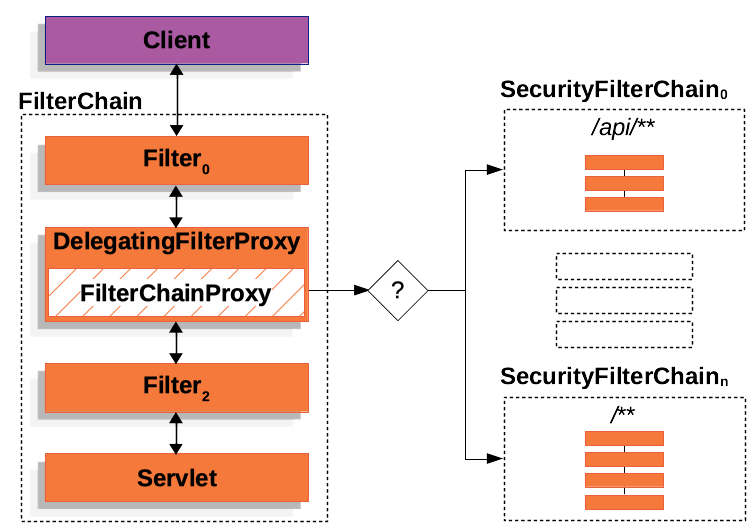
Image source: spring.io
Example:
@Configuration
public class SecurityConfig {

    @Bean
    public SecurityFilterChain securityFilterChain(HttpSecurity http) throws Exception {
        http
            // returns an instance which helps in building request matcher rules.
            .authorizeHttpRequests()
                // public resources
                .antMatchers("/resources/**", "/static/**").permitAll()
                // stored as a list of `RequestMatcher` → `AuthorizationManager` mappings.
                // it builds up into a filter called `AuthorizationFilter` or `FilterSecurityInterceptor`.
                .antMatchers("/admin/**").hasRole("ADMIN")
                .antMatchers("/manager/**").hasAnyRole("MANAGER", "ADMIN")
                .antMatchers("/finance/**").hasAuthority("ROLE_FINANCE")
                .antMatchers("/report/**").hasPermission("READ_REPORT")
                // any request that hasn't already matched a rule will require a user to be logged
                .anyRequest().authenticated()

            // returns a HttpSecurity so we can chain other configurers
            .and()
                // sets up a filter for processing form submissions + /login + /logout + Where to go on login success/failure:
                .formLogin()
                .loginPage("/login")
                .permitAll()

            // returns a HttpSecurity so we can chain other configurers
            .and()
                .logout()
                .logoutUrl("/logout")
                .permitAll();

          return http.build();
    }
}
antMatchers()uses Ant-style path matching (wildcards like*,**, etc.).mvcMatchers()uses Spring MVC path matching (path variables like{id}),
8.2.3. Spring Security Filters:
Spring Security filters are the building blocks of its security system, each handling a specific task
@Configuration
@EnableWebSecurity
public class SecurityConfig {

    @Bean
    public SecurityFilterChain securityFilterChain(HttpSecurity http) throws Exception {
        // SecurityContextPersistenceFilter - Loads and saves SecurityContext
        http.csrf().disable().addFilterBefore(new SecurityContextPersistenceFilter(), UsernamePasswordAuthenticationFilter.class);

        // UsernamePasswordAuthenticationFilter - Handles login form submits
        http.formLogin().loginProcessingUrl("/login");

        // BasicAuthenticationFilter - Handles HTTP Basic Authentication
        http.httpBasic();

        // BearerTokenAuthenticationFilter - Parses and authenticates JWT tokens
        http.oauth2ResourceServer().jwt(); // For JWT-based authorization

        // LogoutFilter - Handles logout requests
        http.logout().logoutUrl("/logout");

        // SecurityContextHolderFilter - Sets SecurityContext into thread-local
        http.addFilterBefore(new SecurityContextHolderFilter(), BasicAuthenticationFilter.class);

        // AnonymousAuthenticationFilter - Assigns anonymous authentication if not authenticated
        http.addFilterBefore(new AnonymousAuthenticationFilter("anonymousKey"), BearerTokenAuthenticationFilter.class);

        // ExceptionTranslationFilter - Translates access denied/authentication exceptions
        http.addFilterAfter(new ExceptionTranslationFilter(), SecurityContextHolderFilter.class);

        // FilterSecurityInterceptor - Final decision on authorization (can user access this resource?)
        http.addFilterBefore(new FilterSecurityInterceptor(), ExceptionTranslationFilter.class);

        // Authorization example for paths
        http.authorizeRequests()
          .antMatchers("/admin/**").hasRole("ADMIN")
          .anyRequest().authenticated();
    }
}
8.3. Authentication:
8.3.1. Basic Terms
-
Authentication Manager: central component that processes authentication requests. uses Authentication Providers to verify credentials. -
ProviderManager: The default implementation ofAuthenticationManager.- Delegates authentication to a list of
AuthenticationProviders (e.g.,DB,JWT,LDAP). - Multiple
ProviderManagers might be needed for totally Isolated Authentication Flows:/api/** → JWT (stateless)and/admin/** → Database + 2FA (stateful)
- Delegates authentication to a list of
-
Authentication Provider: an implementation used by theAuthentication Managerto validate user credentials.- e.g.,
DaoAuthenticationProviderfor database authentication.OAuth2LoginAuthenticationProvider.
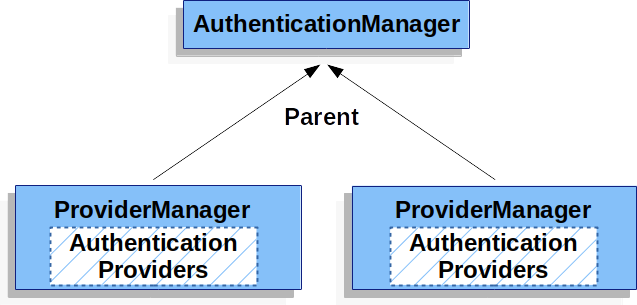
- Image source: spring.io
- e.g.,
-
Authorization Manager: checks whether the authenticated user has the necessary authorities. -
GrantedAuthority: an interface that represents an authority granted to anAuthenticationobject. -
SecurityContext: holds security information, such as the authenticated principal.- stored in
SecurityContextHolderto make it globally accessible within the app.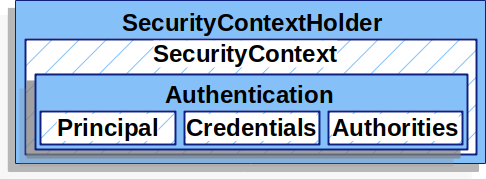
- Image source: spring.io
- stored in
-
AuthenticationObject: the central representation of the current user’s authentication state.- Before Authentication contains:
isAuthenticated = false&credentials. - After Authentication contains:
isAuthenticated = true&principal=UserDetails&authorities.
- Before Authentication contains:
-
UserDetailsService: A service interface for loading user data from a database or anoth er data source. -
BCryptPasswordEncoder: usesbcryptalgorithm. -
DelegatingPasswordEncoder: supports multiple encoders and allows for future upgrades easily.
8.3.2. Flow Examples
curl -u user@mail.com:password123 http://localhost:8080/secure-endpoint- Request Reaches
BasicAuthenticationFilterwhich extracts the email and password from theAuthorization: Basic ...header. - The filter creates a
UsernamePasswordAuthenticationToken(Authentication) and pass it to theProviderManager(AuthenticationManager). - The
ProviderManagerdelegates toDaoAuthenticationProvider(AuthenticationProvider). DaoAuthenticationProviderusesUserDetailsServiceto fetch the user by email from the database.Password Encodercompares the provided password with the stored hashed password in the database.- If authentication is successful, an authenticated
Authenticationobject is created and stored inSecurityContextHolder. - User is granted access to resources based on their roles/permissions.
8.4. Authorization
@Secured: role-based check.@PreAuthorize: validates conditions before method execution.@PostAuthorize: validates return values after method execution.@PreFilter: filters input collections before method execution.@PostFilter: filters output collections after method execution.
@Service
public class OrderService {
    @Secured({"ROLE_ADMIN", "ROLE_MANAGER"})
    public void deleteOrder(Long orderId) { }

    @PreAuthorize("hasRole('USER') and #order.owner.username == authentication.name")
    public void placeOrder(Order order) {}

    @PostAuthorize("returnObject.owner.username == authentication.name")
    public Order getOrderById(Long id) { return orderRepository.findById(id).orElseThrow(); }

    @PreFilter("filterObject.owner == authentication.name")
    public void saveDocuments(List<Document> docs) { ... }

    @PostFilter("filterObject.isPublic or filterObject.owner == principal.username")
    public List<Document> getAllDocuments() { ... }
}
- The SpEL (Spring Expression Language) is used to evaluate security conditions like:
hasRole('ADMIN')hasAuthority('order:read')isAuthenticated()!isAnonymous()#order.owner == principal.usernameauthentication.name#id == authentication.principal.id
9. Actuator
9.1. Basic Terms:
Actuator: provides production-ready monitoring and management endpoints.- Integrates with
Micrometerto auto-publish metrics to aMeterRegistry. The metrics can be accessed through:/actuator/prometheus(text-based Prometheus format)./actuator/metrics?tag=KEY:VALUE(for inspecting metrics manually).
- Provides health status of the application and its components via a
HealthIndicatorsystem.- Default endpoint:
/actuator/health.
- Default endpoint:
- Exposes runtime state and configuration for debugging and monitoring.
- Examples
/actuator/env/actuator/beans/actuator/scheduledtasks/actuator/mappings(the HTTP endpoints and their handler methods)
- All endpoints are enabled by default except
/actuator/shutdown. (enabled doesn't mean exposed).
- Examples
- Integrates with
Micrometer: in-app metrics collection library (integrated with Spring Boot).MeterRegistry: the core interface inMicrometerthat:- creates and manages meters.
- stores metrics in memory.
- might export metrics to monitoring systems.
Prometheus: time-series database that scrapes metrics.Grafana: visualization tool forPrometheusmetrics.
9.2. Using HTTP endpoints vs JMX:
Actuator supports JMX and HTTP.
HTTPis preferred for modern cloud apps due to better REST integration, security, and compatibility with monitoring tools like Prometheus.JMX(Java Management Extensions) remains useful for JVM-level debugging with tools likeJConsole.
9.3. Observability Flow Example:
- Application records metrics using
Micrometer APIs(e.g.,MeterRegistry.counter()). - metrics are stored in-memory in the
MeterRegistry. Actuatorexposes metrics via HTTP endpoints like:/actuator/prometheusPrometheusscrapes/actuator/prometheusat configured intervals. the collected metrics are stored as time-series data.GrafanaqueriesPrometheusto visualize metrics with dashboards.
Note:
Micrometer+Prometheus+Actuator+Grafanasetup is the popular flow but it's not the only one.
9.4. Methods of Instrumenting Metrics:
- Manually: using the meters
Counter,Timer,DistributionSummary(track distribution of values),Gauge(tracks a changing number). - Annotations: record metrics on methods using
@Timed,@Counted,@Gauge. - Actuator: automatically exposes application-related metrics like:
- MVC Related
http.server.requests: Measures request count, duration, response status, method, and URI.tomcat.sessions.active.current: Current number of active HTTP sessions (for embedded Tomcat).tomcat.sessions.created: Total number of sessions created.tomcat.sessions.expired: Number of expired sessions.tomcat.threads.busy: Number of currently busy request-processing threads.tomcat.global.request.max: Maximum number of concurrent requests.
system.uptimesystem.cpu.usageprocess.cpu.usageprocess.uptimeprocess.files.openjvm.memory.usedjvm.memory.maxjvm.threads.livejvm.threads.daemonjvm.classes.loadedjvm.classes.unloaded
- MVC Related
9.5. Hierarchical vs. Dimensional metrics
Hierarchical metrics encode dimensions into the metric name, creating nested paths.
- used with legacy systems (Graphite).
orders.count.us-east.premium
orders.latency.us-east.premium
Dimensional metrics decouple the metric name from its attributes using tags.
- used with
Microservices,K8s,Prometheus.
orders_count{region="us-east", tier="premium"}
orders_latency{region="us-east", tier="premium"}
Micrometer (and modern observability tools) favor dimensional metrics as it enables dynamic filtering/aggregation like:
- Orders per second for premium tier:
rate(orders_count{tier="premium"}[1m]). - Average latency:
rate(orders_latency_sum{region="us-east"}[5m]) / rate(orders_latency_count{region="us-east"}[5m]).
9.6. Instrumenting Metrics Examples:
<dependency>
    <groupId>org.springframework.boot</groupId>
    <artifactId>spring-boot-starter-actuator</artifactId>
</dependency>
9.6.1. Using Built-in annotations:
@Service
public class OrderService {
    private final MeterRegistry registry;

    @Timed(value = "order.process.time", description = "Time taken to process order")
    @Counted(value = "order.count", description = "Total orders processed")
    public void processOrder(Order order) { }
}
/actuator/metrics/order.process.time
{
  "name": "order.process.time",
  "description": "Time taken to process order",
  "measurements": [
    {"statistic": "COUNT", "value": 42},
    {"statistic": "TOTAL_TIME", "value": 5.2},
    {"statistic": "MAX", "value": 0.25}
  ]
}
/actuator/prometheus
# HELP order_process_time_seconds Time taken to process order
# TYPE order_process_time_seconds summary
order_process_time_seconds_count 42
order_process_time_seconds_sum 5.2
order_process_time_seconds_max 0.25
9.6.2. Manually using meters:
@Service
@RequiredArgsConstructor
public class OrderService {
    private final MeterRegistry registry;

    public void refundOrder(Order order) {
        Counter.builder("order.refunds")
            .tag("reason", order.getRefundReason())
            .register(registry)
            .increment();
        // ... logic
    }
}
9.6.3. Custom AOP approach:
@Aspect
@Component
@RequiredArgsConstructor
public class ErrorCounterAspect {
    private final MeterRegistry registry;

    @Around("@annotation(MonitorExecution)")
    public Object count(ProceedingJoinPoint pjp) throws Throwable {
        registry.counter(
            "method.executions", // metric name
            "class", pjp.getTarget().getClass().getSimpleName(), // tag-key, tag-value
            "method", pjp.getSignature().getName()  // tag-key, tag-value
        )
        .increment();
        return pjp.proceed();
    }
}

@MonitorExecution
public void process() {}
9.7. The HealthIndicator System:
- All beans implementing
HealthIndicatorare automatically registered and included in the/actuator/healthendpoint. - Actuator provide built-in indicators like
DataSourceHealthIndicator,DiskSpaceHealthIndicator. - The
/actuator/healthendpoint report their status (UP/DOWN).
{
    "status": "UP",
    "components": {
        "db": { "status": "UP" },
        "disk": { "status": "UP", "details": { "free": "500MB" } }
    }
}
9.7.1. Custom Health Check Example:
@Component
public class ApiHealth implements HealthIndicator {
    @Override
    public Health health() {
        return this.checkApi()
            ? Health.up().withDetail("message", "reachable").build()
            : Health.down().withDetail("error", "unreachable").build();
    }
}
9.7.2. Health Indicator Groups:
Organize and customize health checks.
Built-in Groups:
liveness: checks if the app is running. included checks:ping,diskSpace.readiness: checks if the app can handle traffic. included checks:db,custom-indecators.
Custom Groups:
Example: GET /actuator/health/critical.
management:
  endpoint:
    health:
      group:
        critical:           # Custom group name
          include: db, api  # Only these indicators
          show-details: always
9.8. Securing Actuator
Example of the ActuatorSecurityConfig:
@Configuration
public class ActuatorSecurityConfig {
    @Bean
    public SecurityFilterChain securityFilterChain(HttpSecurity http) throws Exception {
        http
            .authorizeHttpRequests(authz -> authz
                .requestMatchers("/actuator/health", "/actuator/info").permitAll()  // Public access
                .requestMatchers("/actuator/**").hasRole("ADMIN")                   // Restrict others
                .anyRequest().authenticated()
            )
            .httpBasic();  // Use basic auth
        return http.build();
    }
}
Example of the application.yaml.
server:
  port: 8080  # Main application runs on port 8080

management:
  server:
    port: 8081  # Actuator endpoints will run on a separate port
    address: 127.0.0.1  # Actuator only accessible locally

  endpoints:
    enabled-by-default: true
    web:
      exposure:
        include: health, info, metrics  # Only expose selected safe endpoints over HTTP
        exclude: env, beans, threaddump # Explicitly exclude sensitive endpoints

  endpoint:
    health:
      show-details: when-authorized  # Show detailed health info only when the user is authenticated
      roles: ADMIN                   # Require this role to see details
    metrics:
      enabled: true  # Enable /metrics endpoint

spring:
  security:
    user:
      name: admin        # Username for basic auth
      password: secret   # Password (you can externalize this in env vars or vault for safety)
      roles: ADMIN       # Role used to restrict access to sensitive endpoints
9.9. Auditing:
9.9.1. Basic Terms:
AuditEvent: A timestamped record of an action (e.g., login, data change).AuditEventRepository: The interface for storing and retrieving audit events. By default, uses an in-memory implementation.@CreatedBy/@LastModifiedBy: JPA annotations for auto-tracking entity modifications (requires separate@EnableJpaAuditing).
9.9.2. Configuration:
management.endpoint.auditevents.enabled=true
management.endpoints.web.exposure.include=auditevents
9.9.3. Querying Audit Logs:
- Endpoint:
GET /actuator/auditevents - Filters:
?principal=user1&type=LOGIN&after=2024-01-01
{
  "events": [
    {
      "timestamp": "2024-03-20T10:00:00Z",
      "principal": "admin",
      "type": "DATA_MODIFIED",
      "data": { "entity": "Order", "action": "DELETE" }
    }
  ]
}
9.9.4. Custom Events:
@Service
public class OrderService {
    private final AuditEventRepository auditRepo;

    public void deleteOrder(String orderId) {
        auditRepo.add(new AuditEvent(
            "admin",
            "ORDER_DELETED",
            Map.of("orderId", orderId)
        ));
    }
}
9.9.5. Persistence:
AuditEventRepositorycan be overridden to store events permanently (e.g., in a database):
@Repository
public class JpaAuditRepository implements AuditEventRepository {
    @PersistenceContext
    private EntityManager em;

    @Override
    public void add(AuditEvent event) {
        em.persist(event);
    }
}
10. Logging in Spring Boot
- When
spring-boot-starteris on the classpath, the following logging components are automatically configured:SLF4J: Serves as the logging facade (API layer) for application code.Logback: Default implementation (viaspring-boot-starter-logging).jcl-over-slf4j: redirects Spring's internal Commons LoggingJCLcalls toSLF4J.jul-to-slf4j: redirects Java Util Logging (java.util.loggingJUL) toSLF4J(for legacy libraries/JDKlogs)
Log4j2: High-performance alternative toLogback.- requires explicit configuration and
log4j-to-slf4j: RedirectsLog4j2API calls toSLF4J(if present).
- requires explicit configuration and
- Best Practices:
- Parameterized Messages:
// Good - no string concatenation if DEBUG is disabled
log.debug("Processing transaction {} with amount {}", txId, amount);

// Bad - incurs string concatenation cost unconditionally
log.debug("Processing transaction " + txId + " with amount " + amount);
logback-spring.xmlExample:
<configuration>
    <!-- 1. Start with Spring Boot defaults -->
    <include resource="org/springframework/boot/logging/logback/defaults.xml"/>

    <!-- 2. Configure rolling file logs -->
    <appender name="ROLLING_FILE" class="ch.qos.logback.core.rolling.RollingFileAppender">
        <file>${LOG_FILE:-logs/app.log}</file>
        <rollingPolicy class="ch.qos.logback.core.rolling.SizeAndTimeBasedRollingPolicy">
            <!-- Rotate daily or when >100MB, keep 30 days max (compressed) -->
            <fileNamePattern>${LOG_FILE:-logs/app}.%d{yyyy-MM-dd}.%i.log.gz</fileNamePattern>
            <maxFileSize>100MB</maxFileSize>
            <maxHistory>30</maxHistory>
            <totalSizeCap>5GB</totalSizeCap>
        </rollingPolicy>
        <encoder>
            <pattern>${FILE_LOG_PATTERN}</pattern>
            <charset>UTF-8</charset>
        </encoder>
    </appender>

    <!-- 3. Environment-specific setup -->
    <springProfile name="prod">
        <root level="INFO">
            <appender-ref ref="ROLLING_FILE"/> <!-- Production: file only -->
        </root>
    </springProfile>

    <springProfile name="dev">
        <root level="DEBUG">
            <appender-ref ref="CONSOLE"/> <!-- Development: console + file -->
            <appender-ref ref="ROLLING_FILE"/>
        </root>
    </springProfile>
</configuration>