2025-08-10
🤿 Diving Deeper Into Spring Framework (1)
Just earned my Spring Certified Professional Developer certificate from VMware (Broadcom). While studying, I went deep into many Spring Framework concepts and put together these notes. My main sources were the Spring Academy learning path, the Spring documentation, and a few great chats with DeepSeek & ChatGPT. Happy reading 🙂
- 0. Overview
- 0.1. Java EE
- 0.2. Spring Framework
- 1. The IoC Container
- 1.1. Inversion of Control (IoC) Principle
- 1.1.1. Service Locator Pattern
- 1.1.2. Dependency Injection
- 1.2. IoC Container Implementation
- 1.3. Spring Bean Lifecycle
- 1.3.1. Lifecycle Steps
- 1.3.2. The BeanPostProcessor implementations
- 1.3.3. Bean Scopes
- 1.1. Inversion of Control (IoC) Principle
- 2. Java-Based Configuration
- 3. Properties & Profiles
- 4. Validation, Data Binding, and Type Conversion
- 4.1. Data Binding
- 4.2. Type Conversion
- 4.3. Validation
- 5. Resources
- 5.1. Built-in Resource Implementations
- 5.2. Example
- 6. Aspect Oriented Programming
- 6.1. Key Concepts of AOP
- 6.2. Example
- 6.3. Proxies in Spring
- 6.3.1. AOP Proxies
- 6.3.2. Forcing the use of CGLIB proxying
- 6.4. Pointcut Examples
- 7. JDBC Simplification with JdbcTemplate
- 7.1. Spring Template Classes
- 7.2. Using JdbcTemplate
- 7.3. Other Options
- 8. Transaction Management with Spring
0. Overview
0.1. J2EE:
- Known as Java EE - Enterprise Edition. Introduced in 1999.
- An early framework for building enterprise-level applications in Java.
- Has been renamed to Jakarta EE.
- Key Features: Servlets and JSP (JavaServer Pages).
0.2. Spring:
- Released in 2004 to simplify the complexities of Java Enterprise Edition (J2EE).
- Key Features:
- Dependency Injection and AOP.
- Annotations and Java-based configuration, reducing the reliance on XML.
1. The IoC Container
1.1. Inversion of Control Principle:
- A design principle in which the container takes control of the management of objects, instead of the class itself.
1.1.1. Service Locator Pattern:
- A design pattern implementing the IoC principle where a central registry is responsible for providing access to dependencies.
- Client code asks the Service Locator for the required dependency.
public class ServiceLocator {
    private static Map<String, Object> services = new HashMap<>();
    public static Object getService(String serviceName) { return services.get(serviceName); }
    public static void registerService(String serviceName, Object service) { services.put(serviceName, service); }
}
1.1.2. Dependency Injection:
- A design pattern implementing the IoC principle which allows objects to receive their dependencies from an external source rather than creating them themselves.
- Easier maintenance, better unit testing practices.
public EmailSender() { this.emailService = new GmailService(); }
// vs
public EmailSender(EmailService emailService) { this.emailService = emailService; }
1.2. IoC Container Implementation:
- BeanFactory: The basic IoC container that provides basic features (instantiation and dependency injection).
- ApplicationContext: An interface built on top of BeanFactory provides more features like (event publishing, messaging, i18n).
@Configuration
@Import({DataSourceConfig.class, ServiceConfig.class})
public class AppConfig {
    @Bean
    public UserService userService() { return new UserServiceImpl(); }
}

public class App {
    public static void main(String[] args) {
        ApplicationContext context = new AnnotationConfigApplicationContext(AppConfig.class);
        UserService userService = context.getBean(UserService.class);
    }
}
1.2.1. Configuring the Spring Container:
- XML-Based Configuration: for legacy applications
ClassPathXmlApplicationContext. - Java-Based Configuration: for modern applications
AnnotationConfigApplicationContext. - Web Application Contexts:
XmlWebApplicationContext&AnnotationConfigWebApplicationContext
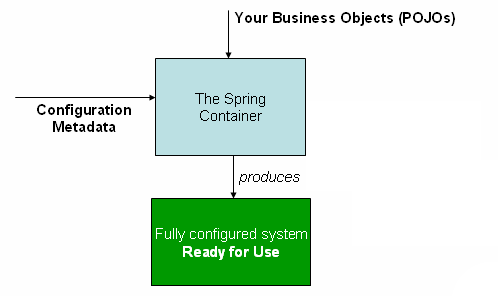
Image source: spring.io
1.3. Spring Bean Lifecycle:
1.3.1. Lifecycle Steps:
- Spring detects bean definitions from:
- XML: (
<bean>tags). - Annotations: (
@Component,@Bean). - Programmatic registration: (via
BeanDefinitionRegistry).
- XML: (
- Spring converts each bean configuration into a
BeanDefinitionobject, stored inDefaultListableBeanFactory(a registry).BeanDefinition: contains (name, class, scope, properties, constructor-arguments, ...).
- Spring allows modification of
BeanDefinitions through theBeanFactoryPostProcessorimplementations.- Example usage: altering bean definitions based on environment.
@Component
public class BeanFactoryPostProcessorImpl implements BeanFactoryPostProcessor {
    @Override
    public void postProcessBeanFactory(ConfigurableListableBeanFactory factory) {
        BeanDefinition beanDefinition = factory.getBeanDefinition("dataSource");
        beanDefinition.setScope(BeanDefinition.SCOPE_PROTOTYPE);  // changing the scope for some reason
        beanDefinition.getPropertyValues().add("url", env.getProperty("env.datasource.url"));
    }
}
- Spring creates the bean instances and injects its dependencies based on its
BeanDefinitions. - Spring checks the beans that implement the aware callback interfaces and injects the relevant object. Examples:
BeanFactoryAware: to get access to theBeanFactorythat created the bean.- Example usage: dynamically retrieve different instances of a bean based on certain conditions at runtime.
paymentService = (PaymentService) beanFactory.getBean("creditCardPaymentService");.
ApplicationContextAware: to get access to theApplicationContext.- Example usage: publishing application-wide events.
applicationContext.publishEvent(new UserCreatedEvent(this, username));.
EnvironmentAware: when a bean needs to be aware of the SpringEnvironmentand the application's configuration properties.BeanNameAware: when a bean needs to be aware of its own name.- Example usage: custom logging based on bean name.
public class CustomLogger implements BeanNameAware {
    private String name;
    @Override
    public void setBeanName(String name) { this.name = name; }
    public void log(String message) { System.out.println("[" + name + "] - " + message); }
}

@Configuration
public class AppConfig {
    @Bean(name = "firstLogger")
    public CustomLogger firstLogger() { return new CustomLogger(); }
    @Bean(name = "secondLogger")
    public CustomLogger secondLogger() { return new CustomLogger(); }
}

CustomLogger firstLogger = (CustomLogger) context.getBean("firstLogger");   // firstLogger.log("")
CustomLogger secondLogger = (CustomLogger) context.getBean("secondLogger"); // secondLogger.log("")
- Spring calls the
postProcessBeforeInitialization()method ofBeanPostProcessorimplementations.
@Component
public class EarlyValidationProcessor implements BeanPostProcessor {
    @Override
    public Object postProcessBeforeInitialization(Object bean, String beanName) {
        // bean is created, dependencies injected but @PostConstruct hasn't run yet
        // validateSensitiveFields (ex: database weak username/password).
        return bean;
    }
}
- Spring calls the initialization methods in this order:
- Methods annotated with
@PostConstruct(used most of the time). afterPropertiesSet()method if the bean implementsInitializingBean(mostly legacy).- Custom
init-methodspecified in configuration (third-party class can't be modified).
- Methods annotated with
@Component
public class DatabaseService implements InitializingBean {
    @PostConstruct
    public void postConstruct() { System.out.println("1"); }

    @Override
    public void afterPropertiesSet() { System.out.println("2"); }

    public void customInit() { System.out.println("3"); }
}

@Configuration
public class AppConfig {
    @Bean(initMethod = "customInit")
    public DatabaseService databaseService() { return new DatabaseService(); }
}
- Spring calls the
postProcessAfterInitialization()method ofBeanPostProcessorimplementations.- Example usage: creating proxies (AOP), caching setup.
@Component
public class CustomBeanPostProcessor implements BeanPostProcessor {
    @Override
    public Object postProcessAfterInitialization(Object bean, String beanName) {
        if (bean instanceof PaymentService) {
            // Could wrap bean in a proxy here
        }
        return bean;
    }
}
- The fully initialized bean is now available in the IoC container for dependency injection and usage.
- When the
ApplicationContextis closed or the bean is being destroyed, Spring calls the destruction methods in this order:- Methods annotated with
@PreDestroy. destroy()method if the bean implementsDisposableBean.- Custom
destroy-methodspecified in configuration.
- Methods annotated with
1.3.2. The BeanPostProcessor implementations:
Spring uses BeanPostProcessor in conjunction with annotations to make the core IoC container aware of specific annotations:
- Spring provides special
BeanPostProcessorimplementations that scan for specific annotations. - When annotations are found, these processors often create proxies around the beans.
- The proxies inject the annotation's specified behavior.
Examples:
AutowiredAnnotationBeanPostProcessorscans beans for@Autowiredannotations.InitDestroyAnnotationBeanPostProcessorscans beans for@PostConstruct/@PreDestroy.
1.3.3. Bean Scopes:
@Bean
@Scope("singleton")
public UserService userService() { return new UserServiceImpl(); }
- Singleton: one instance of the bean is created for the entire Spring container.
- Prototype: creates a new instance of the bean every time it is requested from the container. Suitable for beans that hold transient state.
- Thread: within a single thread, the same bean instance is returned.
- Example usage: a logging bean in multi-threaded environments that should only log information specific to the thread it's running in.
- Request: within a single HTTP request, the same bean instance is returned.
- Session: within a single HTTP session, the same bean instance is returned.
- WebSocket: within a single WebSocket session, the same bean instance is returned.
- Application: One bean instance per
ServletContext(i.e., per web application in a server).
2. Java-Based Configuration
2.1. Core Annotations:
@Configuration: Indicates that a class declares one or more@Beanmethods.- Can't be
final: Spring createsCGLIBproxies for@Configurationclasses to manage@Beanmethod calls. Final classes can't be proxied. - Can't be
private: Private classes can't be instantiated or proxied by Spring.
- Can't be
@Bean: applied to methods in a@Configuration-annotated class. The return value should be registered as a bean in the IoC container.@Lazy: the bean will not be created until it is first requested.
2.1.1. Example:
@Configuration
@Import({DataSourceConfig.class, ServiceConfig.class}) // import other `@Configuration` classes
public class AppConfig {
    @Bean
    public UserService userService() { return new UserServiceImpl(); }
}

public class App {
    public static void main(String[] args) {
        ApplicationContext context = new AnnotationConfigApplicationContext(AppConfig.class);
        UserService userService = context.getBean(UserService.class);
    }
}
2.2. Dependency Injection Conflict Resolution:
@DependsOn: ensures that specified beans are created before the current bean.@Qualifier: explicit bean selection.@Primary: default bean preference.@Fallback: the bean will not be created until it is first requested.
2.2.1. Example:
@Configuration
public class AppConfig {
    @Bean(name = "file") // named explicitly. otherwise name will be "fileLogger" (method name)
    public Logger fileLogger()    { return new Logger("FileLogger"); }

    @Bean
    @Primary // default choice if no @Qualifier is used
    public Logger consoleLogger() { return new Logger("ConsoleLogger"); }
}

@Service
public class LogService {
    @Autowired    // Injects consoleLogger because it's marked @Primary
    private Logger defaultLogger;

    @Autowired    // Injects fileLogger by name
    @Qualifier("file")
    private Logger fileLogger;
}
@Configuration
public class AppConfig {
    @Bean
    public Logger fileLogger()    { return new Logger("FileLogger"); }

    @Bean
    @Fallback
    public Logger dbLogger()      { return new Logger("DBLogger"); }
}

@Service
public class LogService {
    @Autowired    // @Fallback is here to avoid NoUniqueBeanDefinitionException
    private Logger fileLogger;
}
2.3. Registering Beans: Explicit vs. Stereotype-Based:
2.3.1. Explicit Registration:
- Manually defines beans either programmatically using Java (
@Bean) or declaratively via XML. - Use Case: defining a custom
DataSourcefor a multi-environment application.
@Configuration
public class DataSourceConfig {
    @Bean
    @Profile("prod")
    public DataSource prodDataSource() {
        HikariConfig config = new HikariConfig();
        // ... configure and return HikariDataSource
        return new HikariDataSource(config);
    }
}
2.3.2. Stereotype Annotations-Based Registration:
- Automatically registers stereotype-annotated beans via classpath scanning
@ComponentScan. - Stereotype Annotations:
@Component: to annotate any spring-managed component.@Service: a service layer component (business logic).@Repository: a Data Access Object that encapsulates storage, retrieval, and search behavior.@Controller: a web controller that handles HTTP requests.@RestController: A specialized version of@Controller. Combines@Controllerand@ResponseBody.
@Configuration
@ComponentScan(basePackages = "com.example.app") // scans for stereotypes
public class AppConfig {}

@Service  // implicit registration via scanning
public class UserService {}
2.4. Injecting the Dependencies:
@Autowired(2003): Spring-native type-driven DI annotation. Created before Java DI standards existed (the recommended choice).@Resource(JSR-250, 2006): Java EE name-first DI annotation (javax.annotation). Part of Java EE 5's simplification effort.@Inject(JSR-330, 2009): Java-standard type-driven DI annotation (javax.inject).
2.4.1. Strategies:
- Constructor Injection: considered as the best practice.
- Easy to pass mock dependencies in unit tests.
- Explicitly declares mandatory dependencies.
- Method Injection: dependencies are injected via a setter method.
- Useful when dependencies are not mandatory.
- Field Injection: harder unit testing. Cannot easily provide mock implementations of dependencies.
@Autowiredon a beans collection: Instantiate a collection filled with all the beans of the type.@Autowiredon final fields: Can't inject dependencies.
2.5. Optional Dependency Injection:
- Beans will only be injected if present in the application context to prevent startup failures due to missing beans.
@Autowired(required = false): Field is injected if bean exists, otherwise set tonull.@Nullable: Marks a constructor/method parameter as optional (usesnullif absent).Optional<T>: Wraps the bean in anOptional, which isemptyif not available.
@Component
public class NotificationService {

    // Field injection - null if PushSender not present
    @Autowired(required = false)
    private PushSender pushSender;

    // Constructor injection - mailSender is null if not present
    private final MailSender mailSender;

    @Autowired
    public NotificationService(@Nullable MailSender mailSender) {
        this.mailSender = mailSender;
    }

    // Optional injection - Optional.empty() if SmsSender not present
    @Autowired
    private Optional<SmsSender> smsSender;

    public void sendAll(String message) {
        if (pushSender != null) pushSender.send(message);
        if (mailSender != null) mailSender.send(message);
        smsSender.ifPresent(s -> s.send(message));
    }
}
3. Properties & Profiles
3.1. Properties (Externalized Configuration):
3.1.1. Priority Order
Spring supports storing configuration outside the code, loaded in this order of priority:
- Command-line arguments (
--server.port=8081). Overrides everything else. - OS environment variables.
- Property files loaded via
@PropertySource.
3.1.2. Accessing Properties:
@Value: simple, one-off values@Value("${db.url}") private String dbUrl;.PropertySourcesPlaceholderConfigurer: resolve${…}placeholders.
Environment: Programmatic access.@PropertySource("classpath:app.properties"): Load custom.propertiesfiles.
@Configuration
@PropertySource("classpath:custom.properties") // load custom.properties file
public class AppConfig {

    @Value("${app.name}")
    private String appName;

    private final Environment env;
    private final DatabaseConfig dbConfig;

    public AppConfig(Environment env, DatabaseConfig dbConfig) {
        this.env = env;
        this.dbConfig = dbConfig;
    }

    public void showAllPropertyAccessMethods() {
        System.out.println(appName);   // @Value
        System.out.println(env.getProperty("app.database.url")); // Environment
    }
}
3.1.3. Spring Expressions Language SpEL:
-
A powerful expression language integrated into Spring for querying and manipulating objects at runtime.
-
Complex SpEL can affect the performance.
-
User-provided input can lead to code injection.
-
Common Usage:
@ValueAnnotations:@Value("#{systemEnvironment['ENV'] == 'prod' ? 'prod.db' : 'dev.db'}")- Spring Security:
@PreAuthorize("hasRole('ADMIN') and #{user.id == authentication.principal.id}")
@Component
public class SpELDemo {

    // Literals & Arithmetic
    @Value("#{42}")                               // Integer literal
    private int literalInt;

    @Value("#{3.14 * 2}")                         // Arithmetic expression
    private double multiplied;

    // Boolean & Logical
    @Value("#{5 > 3 && 10 < 20}")                 // true
    private boolean logicalAnd;

    @Value("#{!(false)}")                         // true
    private boolean logicalNot;

    // String Operations
    @Value("#{'  Hello  '.trim().toUpperCase()}") // "HELLO"
    private String processedString;

    @Value("#{'Spring'.length()}")                // 6
    private int stringLength;

    // Ternary + Elvis + Safe Navigation
    @Value("#{5 > 3 ? 'yes' : 'no'}")             // Ternary: "yes"
    private String ternary;

    @Value("#{someBean?.optionalField}")          // Safe navigation
    private String safeNavigation;

    @Value("#{someBean.optionalField ?: 'default'}") // Elvis fallback
    private String elvis;

    // Method & Static Access
    @Value("#{T(java.lang.Math).pow(2, 3)}")      // 8.0
    private double power;

    @Value("#{T(java.time.LocalDate).now().getYear()}") // Current year
    private int currentYear;

    @Value("#{T(java.lang.Math).PI}")             // 3.1415...
    private double pi;

    // Type Conversion & Comparison
    @Value("#{new java.math.BigDecimal('10.5').compareTo(new java.math.BigDecimal('10.0')) > 0}") // true
    private boolean bigDecimalCompare;

    // Bean Reference
    @Value("#{someBean.message}")                 // Accessing another bean's field
    private String fromAnotherBean;

    // Collections: Selection & Projection
    @Value("#{{1, 2, 3, 4}.?[#this > 2]}")       // [3, 4]
    private List<Integer> filteredList;

    @Value("#{{'a','b','c'}.![#this.toUpperCase()]}") // ["A", "B", "C"]
    private List<String> upperList;

    // Inline List & Map
    @Value("#{{'dev','test','prod'}}")           // Inline List
    private List<String> profiles;

    @Value("#{{'key1':'val1','key2':'val2'}}")   // Inline Map
    private Map<String, String> keyValueMap;
}
3.2. Profiles: Environment-Specific Configs
- Profiles allow you to define environment-specific beans and configurations (e.g.,
dev,test,prod). @Profile: Beans are registered only when the specified profile is active.- To activate profiles:
java -Dspring.profiles.active=dev,debug,aws -jar app.jar.
public interface PaymentService {
    String processPayment();
}

@Service
@Profile("dev")
public class MockPaymentService implements PaymentService {
    @Override
    public String processPayment() { return "[DEV] Simulated payment of $10"; }
}

@Service
@Profile("prod")
public class StripePaymentService implements PaymentService {
    @Override
    public String processPayment() { return "[PROD] Processed $10 via Stripe"; }
}

@RestController
public class CheckoutController {
    @Autowired
    private PaymentService paymentService;

    @PostMapping("/pay")
    public String pay() {
        return paymentService.processPayment();
    }
}
4. Validation, Data Binding, and Type Conversion
Spring Boot/MVC use these features behind the scenes — e.g., @RequestParam, @PathVariable auto-bind and convert request data.
4.1. Data Binding:
Automatically binds HTTP request parameters (e.g., form inputs, query strings) to Java objects.
@Controller
public class UserController {
    @PostMapping("/user")
    public String submit(@ModelAttribute User user) { /* binds params to User object automatically */ }
}
4.2. Type Conversion:
Converts values between types (e.g., String → Integer, String → LocalDate).
public class User {
    @DateTimeFormat(pattern = "yyyy-MM-dd")
    private LocalDate birthDate;
}
4.3. Validation:
Checks constraints (@NotBlank, @Email) and populates BindingResult.
public class User {
    @Email
    @NotBlank
    private String email;
}

@Controller
public class UserController {
    @PostMapping("/user")
    public String submit(@Valid User user, BindingResult result) {
        if (result.hasErrors()) { return "error-page"; }
        // Proceed if valid
    }
}
5. Resources:
5.1. Built-in Resource Implementations:
ClassPathResource: Loads resources from the classpath (e.g.,src/main/resources).FileSystemResource: Accesses files from the local file system.UrlResource: Wrapsjava.net.URL; supports protocols like HTTP, FTP, etc.ServletContextResource: Accesses web application resources (e.g.,WEB-INF/).ByteArrayResource: Reads from an in-memory byte array.
5.2. Example:
Resource resource = new ClassPathResource("data.txt");
String content = Files.readString(resource.getFile().toPath());
6. Aspect Oriented Programming
- AOP aims to separate cross-cutting concerns from the main business logic of an application.
- It adds additional behavior - like logging or security - to the existing code without modifying the code itself.
@EnableAspectJAutoProxy: enables support for handling@Aspect-annotated components.- In Spring Boot, it's often implicitly enabled via
@SpringBootApplication.
- In Spring Boot, it's often implicitly enabled via
6.1. Key Concepts of AOP:
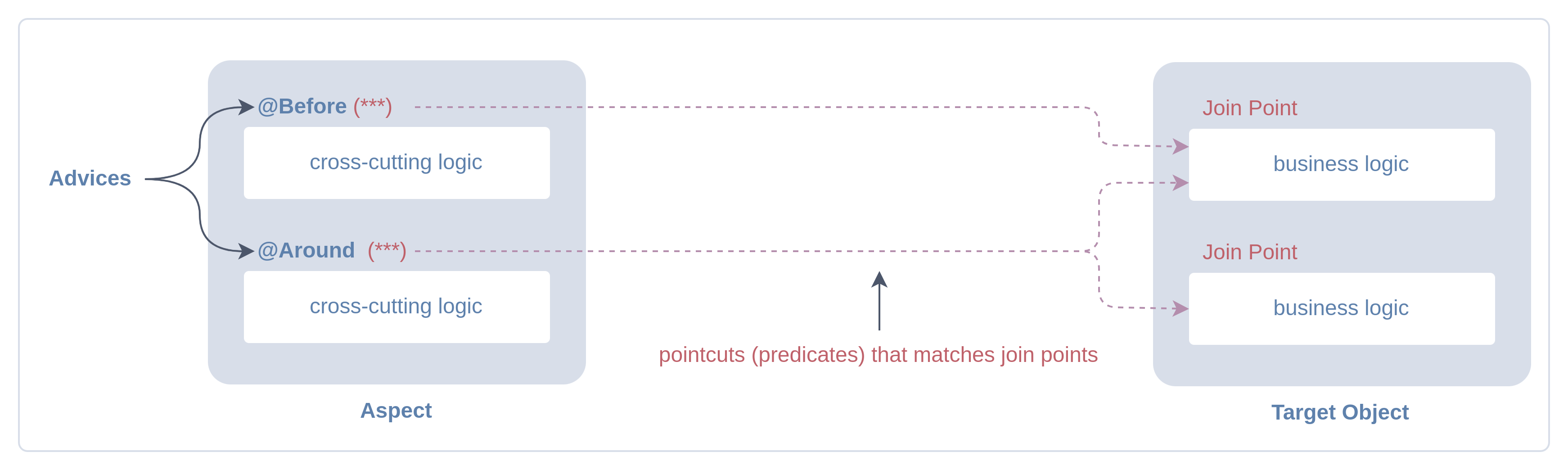
Aspect: A module encapsulates a cross-cutting concern.Advice: Action taken by an aspect when a particular join point is reached.- Advice Types:
- Non-Wrapping Advice (
JoinPoint):@Before,@After,@AfterReturning,@AfterThrowing.- Common operations:
jp.getArgs(),jp.getSignature(),jp.getTarget().
- Common operations:
- Wrapping Advice (
ProceedingJoinPoint):Around.- Common operations:
pjp.proceed().
- Common operations:
- Non-Wrapping Advice (
- Advice Types:
Pointcut: A predicate that matches join points.Target Object: An object being advised by one or more aspects.Join Point: A point during the execution of a program. e.g. method call.Weaving: Integrating aspects into the application code.- Java AOP frameworks perform weaving at runtime.
6.2. Example:
@EnableAspectJAutoProxy
class AppConfig {}

@Aspect // A module that encapsulates a cross-cutting concern (logging in this case)
@Component
public class LoggingAspect {
    @Pointcut("execution(* com.example.service.UserService.*(..))") // A predicate that matches join points
    public void userServiceMethods() {}

    @AfterReturning("userServiceMethods()") // Action taken after a method in UserService returns successfully
    public void logAfterReturning(JoinPoint joinPoint) {
        System.out.println("After returning from method: " + joinPoint.getSignature().getName());
    }

    @Around("userServiceMethods()") // Action taken around a method in UserService
    public Object logAround(ProceedingJoinPoint joinPoint) throws Throwable {
        long start = System.currentTimeMillis();
        Object proceed = joinPoint.proceed();
        long executionTime = System.currentTimeMillis() - start;
        System.out.println(joinPoint.getSignature().getName() + " executed in " + executionTime + "ms");
        return proceed;
    }
}

@Service
public class UserService {    // The Target Object being advised
    public void createUser(String username) { /* ... */ }  // a join point.
    public void deleteUser(String username) { /* ... */ }  // a join point.
}
6.3. Proxies in Spring:
- When Spring finds a bean that needs proxying (for AOP, transactions, etc.), it creates a proxy object.
- When you call a method on the proxy, it can add extra actions (like starting a transaction or logging).
- After the extra actions, the proxy calls the real method on the target object.
- The target object runs the method, then control goes back to the proxy.
- The proxy can perform additional actions (such as committing or rolling back a transaction) before returning the result.
6.3.1. AOP Proxies
Spring AOP chooses between JDK dynamic proxies and CGLIB proxies based on the target object's characteristics:
JDK dynamic proxy(Interface-based Proxies) is used if the target object implements an interface.- Used as the Default in Spring.
CGLIBis used only when necessary.
- Used as the Default in Spring.
CGLIB proxy(Class-based Proxies) is created if the target object does not implement any interfaces.- Spring Boot configures Spring AOP to use
CGLIBproxies by default.
- Spring Boot configures Spring AOP to use
6.3.2. Forcing the use of CGLIB proxying:
- Need to intercept all methods, including non-interface methods.
- Want to apply aspects on classes that do not implement interfaces.
@EnableCaching(proxyTargetClass = true)
@EnableAspectJAutoProxy(proxyTargetClass = true)
@EnableTransactionManagement(proxyTargetClass = true)

// application.properties
// spring.aop.proxy-target-class=true
6.4. Pointcut Examples
@Component
@Aspect
public class LoggingAspect {

    // execution([modifier] return-type declaring-type-pattern method-name-pattern(param-pattern) throws-pattern?)
    // Match specific method signature
    @Before("execution(void com.example.service.UserService.createUser(String))")

    // Match any method named 'save'
    @Before("execution(* save(..))")

    // Match public methods returning anything with any args
    @Before("execution(public * *(..))")

    // Match all methods in a specific package (no subpackages)
    @Before("execution(* com.example.service.*.*(..))")

    // Match all methods in a package and its sub-packages
    @Before("execution(* com.example..*.*(..))")

    // Match all methods in classes ending with 'Service'
    @Before("execution(* com.example..*Service.*(..))")

    // Match methods annotated with @Transactional
    @Before("@annotation(org.springframework.transaction.annotation.Transactional)")

    // Match all methods inside repository package (including subpackages)
    @Before("within(com.example.repository..*)")

    // Match methods in classes annotated with @RestController
    @Before("@within(org.springframework.web.bind.annotation.RestController)")

    // Match methods with *parameters* annotated with custom @Audit annotation
    @Before("@args(com.example.annotations.Audit)")

    // Match methods with a single String argument
    @Before("args(String)")

    // Match methods where first arg is String, followed by anything
    @Before("args(String, ..)")

    // Match methods with any two arguments
    @Before("args(*, *)")

    // Match beans whose names start with 'repo'
    @Before("bean(repo*)")

    // Match method annotated with @Transactional AND with String arg
    @Before("@annotation(org.springframework.transaction.annotation.Transactional) && args(String)")
}
7. JDBC Simplification with JdbcTemplate
7.1. Spring Template Classes:
- Spring Template Classes are based on the Template Method Design Pattern.
- Template Method Design Pattern: a high-level process is defined in a base class, and certain steps are left open for customization.
- Common Template Classes:
JdbcTemplate,KafkaTemplate, andRestTemplate.
7.2. Using JdbcTemplate:
- The process of interacting with the database is predefined by Spring through the template.
- Specific parts of the process can be customized.
JdbcTemplatethrows an uncheckedDataAccessExceptioninstead of a checkedSQLException(must be wrapped in try-catch).JdbcTemplateobtains connections dynamically at runtime from the configuredDataSource.
public class JdbcTemplateExample {

    private JdbcTemplate jdbcTemplate;

    public void start() {

        // ================================
        // 0. DDL Operation (Create Table)
        // ================================
        // DDL = Data Definition Language
        // Use execute() for DDL commands
        jdbcTemplate.execute("CREATE TABLE IF NOT EXISTS users (id INT PRIMARY KEY, name VARCHAR(255))");

        // ================================
        // 1. DML Operation (Insert - Single Row)
        // ================================
        // DML = Data Manipulation Language
        // INSERT, UPDATE, DELETE
        jdbcTemplate.update("INSERT INTO users(id, name) VALUES (?, ?)", 1, "Aziz");

        // ----------------------------------------
        // Callback Interfaces: PreparedStatementSetter – Functional
        jdbcTemplate.update("INSERT INTO users(name) VALUES (?)", (PreparedStatement ps) -> ps.setString(1, "Ali"));

        // ================================
        // 2. Batch Update (Multiple Rows)
        // ================================
        // BatchPreparedStatementSetter – Not functional (2 methods)
        List<String> names = Arrays.asList("Alice", "Bob", "Charlie");
        jdbcTemplate.batchUpdate("INSERT INTO users(name) VALUES (?)",
            new BatchPreparedStatementSetter() {
                public void setValues(PreparedStatement ps, int i) throws SQLException {
                    ps.setString(1, names.get(i));
                }
                public int getBatchSize() {
                    return names.size();
                }
            }
        );

        // ================================
        // 3. Query for a Single Object
        // ================================
        // Callback Interfaces: RowMapper<T> – Functional
        User user = jdbcTemplate.queryForObject(
            "SELECT * FROM users WHERE id = ?",
            (rs, rowNum) -> new User(rs.getInt("id"), rs.getString("name")),
            1
        );

        // ================================
        // 4. Query for a Map (Single Row as Map<String, Object>)
        // ================================
        Map<String, Object> userMap = jdbcTemplate.queryForMap(
            "SELECT * FROM users WHERE id = ?", 1
        );

        // ================================
        // 5. Query for a List (Multiple Rows, Each as Map)
        // ================================
        List<Map<String, Object>> userList = jdbcTemplate.queryForList(
            "SELECT * FROM users"
        );

        // ================================
        // 6. Query with Custom RowMapper (Multiple Rows → List<T>)
        // ================================
        List<User> users = jdbcTemplate.query(
            "SELECT * FROM users",
            (rs, rowNum) -> new User(rs.getInt("id"), rs.getString("name"))
        );

        // ================================
        // 7. Query with Callback Interfaces: ResultSetExtractor (Full control)
        // ================================
        List<User> extracted = jdbcTemplate.query("SELECT * FROM users",
            (ResultSet rs) -> {
                List<User> result = new ArrayList<>();
                while (rs.next()) {
                    result.add(new User(rs.getInt("id"), rs.getString("name")));
                }
                return result;
            }
        );

        // ================================
        // 8. Process each row without returning. Callback Interfaces: RowCallbackHandler
        // ================================
        jdbcTemplate.query("SELECT * FROM users", rs -> {
            System.out.println("User (lambda): " +
                rs.getInt("id") + " - " + rs.getString("name"));
        });
    }
}
7.3. Other Options:
- JPA (Java Persistence API): provides specification for object-relational mapping (
ORM). - Hibernate: A popular implementation of JPA with additional features. Others: EclipseLink, OpenJPA.
- Spring Data JPA: Reduces boilerplate with repository abstraction. Uses Hibernate implementation by default.
8. Transaction Management with Spring
8.1. Transaction:
- A sequence of operations treated as a single unit.
- Ensures consistency and integrity when accessing shared resources (like a database).
- If Account A was debited but Account B was not credited, the system would be inconsistent.
- Insert a new order with a
CustomerIDthat doesn’t exist in thecustomerstable, the system would have integrity issues.
- Enables concurrent access by making sure all operations succeed or fail together.
8.2. ACID:
- Atomicity: Either all operations are executed, or none are.
- Consistency: Data remains valid after a transaction.
- Isolation: Prevents interference between concurrent transactions.
- Durability: Changes are permanent once committed.
8.3. PlatformTransactionManager Implementations:
This interface provides a unified way to manage transactions across different types of transactional resources:
DataSourceTransactionManager: Manages transactions for a single JDBCDataSource.JpaTransactionManager: for JPA-based persistence (e.g., Hibernate, EclipseLink) usingEntityManager.HibernateTransactionManager: for Hibernate, directly integrating with theSessionFactory.JtaTransactionManager: Handles distributed/global transactions using JTA, coordinating transactions across multiple resources.JmsTransactionManager: for Java Message Service operations, ensuring message sending/receiving is transactional.
8.4. Using Spring Transaction Management:
Spring provides a declarative and programmatic approach to transaction management.
Programmatic Transactions:
PlatformTransactionManager: An interface that defines how transactions are started, committed, and rolled back.- Independent of the underlying technology (JDBC, JPA, Hibernate, etc.).
TransactionTemplate: A helper class that wrapsPlatformTransactionManagerto simplify programmatic transactions.
transactionTemplate.execute(status -> {
    // code inside transaction
    myRepository.save(entity);
    return null;
});
Declarative Transactions:
-
Annotations are used to define transactional behavior at the method or class level. (Recommended)
-
Common Annotations:
@EnableTransactionManagement: Enable transaction support Java configuration.@Transactional: Marks a method or class as transactional.
-
When a method is annotated with
@Transactionalin Spring:- A proxy is created around the class.
- The proxy intercepts calls to the method.
- The proxy checks the annotation settings to start or join a transaction using
PlatformTransactionManager. - The actual method runs within the transaction.
- If the method succeeds, the transaction is committed; if it fails, it is rolled back.
@Configuration
@EnableJpaRepositories
@EnableTransactionManagement // Enables transaction management in the application
public class AppConfig {
    @Bean
    public PlatformTransactionManager transactionManager(DataSource dataSource) {
        return new JpaTransactionManager(dataSource); // Configures the JPA transaction manager with the datasource
    }
}

@Service
public class UserService {
    @Autowired
    private UserRepository userRepository; // Assume this is a JPA repository

    @Transactional // Marks the method as transactional
    public void createUser(User user) {
        userRepository.save(user); // This operation will be part of a transaction
    }
}
8.5. Rollback:
- By default, Spring rolls back a transaction when a
RuntimeException/java.lang.Error(unchecked exceptions) is thrown. rollbackForandnoRollbackForare used to customize rollback behavior.
@Transactional(rollbackFor = {Exception.class}, noRollbackFor = {NullPointerException.class})
public void processTransaction() { ... }
8.6. Local vs. Global (Distributed) Transaction Management:
- Spring supports both:
- Local transactions (single resource).
- Global/distributed transactions (multiple resources coordinated together).
8.6.1. Local Transaction Management:
- Managed by Spring's resource-specific transaction managers:
DataSourceTransactionManager(for plain JDBC)JpaTransactionManager(for JPA providers like Hibernate)HibernateTransactionManager(direct Hibernate integration)
@Transactional
public void transferFunds(Long fromId, Long toId, BigDecimal amount) {
    accountRepository.debit(fromId, amount);
    accountRepository.credit(toId, amount);
}
8.6.2. Global (Distributed) Transaction Management:
- Involves multiple transactional resources participating in the same unit of work.
- Examples: two databases, or a database and a message broker.
- Integrated with an external transaction coordinator like
Atomikos,Bitronix, orNarayana. - Distributed transactions are generally discouraged in modern, cloud-native, and microservice-based systems.
- Alternatives:
- Saga Pattern: Chain of local transactions. With compensating actions for rollback. Can be orchestrated or event-driven.
- Event-Driven Architecture: Services emit and react to events.
8.7. Transaction Isolation Levels:
-
Controls how and when changes made by one transaction become visible to others.
-
Weak transaction isolation levels can produce read anomalies:
- Dirty Read: Read uncommitted data from another transaction.
- Non-Repeatable Read: Re-reading same row gives different result due to update.
- Phantom Read: New rows appear in a repeated range query.
-
Isolation Levels:
READ_UNCOMMITTED: ✅ Dirty Read, ✅ Non-Repeatable Read, ✅ Phantom ReadREAD_COMMITTED: ❌ Dirty Read, ✅ Non-Repeatable Read, ✅ Phantom ReadREPEATABLE_READ: ❌ Dirty Read, ❌ Non-Repeatable Read, ✅ Phantom ReadSERIALIZABLE: ❌ Dirty Read, ❌ Non-Repeatable Read, ❌ Phantom Read
@Transactional(isolation = Isolation.REPEATABLE_READ)
public void readAccountDetails() {
    // Will prevent dirty and non-repeatable reads
}
8.8. Transaction Propagation:
Transaction propagation determines how transactions are managed when one transactional method calls another.
REQUIRED:- Joins the current transaction if one exists; otherwise, it starts a new transaction.
- Everything runs in a single transaction.
- Most common and safest choice for service methods.
REQUIRES_NEW:- Always starts a new transaction, suspending any existing one.
- Useful when the inner operation must commit or roll back independently, like logging, auditing, or retry logic.
SUPPORTS:- Joins the current transaction if one exists; otherwise, it runs without a transaction.
- No new transaction is created.
- Good for read-only methods that can work with or without a transaction.
NOT_SUPPORTED:- Runs without a transaction. If a transaction is active, it is suspended during execution.
- Useful when calling non-transactional systems like external APIs to avoid transactional overhead.
MANDATORY:- Requires an existing transaction. If there isn't one, it throws an exception.
- Use when the method must be part of a larger transaction managed by the caller.
NEVER:- Must run outside any transaction. If a transaction exists, it throws an exception.
- Use to ensure that certain logic never participates in a transaction, like direct system calls.
NESTED:- Joins the current transaction and creates a
savepoint. - If no transaction exists, it starts a new one (like
REQUIRED). - Allows rolling back just the inner part without affecting the outer transaction.
REQUIRES_NEWsaves its changes even if the outer method fails, butNESTEDwill lose its changes if the outer method fails.
- Joins the current transaction and creates a
@Transactional(propagation = Propagation.REQUIRES_NEW)
public void processPayment(Payment payment) { paymentRepository.save(payment); }
- When a method calls another method within the same class, transaction propagation rules do not apply because they bypass the Spring proxy that manages transactions.