2021-07-02
🤿 Diving Deeper Into SSL Certificates
Recently in my work, I was supposed to buy and install SSL certificates for several domains, so users will see https instead of http in the browser's URL bar, all I knew is the website will be more secure and the transmission of data in cables will be encrypted. I got the task done by blindly following some foggy tutorials. the good part is I saved some ambiguous keywords in my to-do list so I can search about them now.
will be so glad for your help in fixing a typo, introducing a better way to construct a phrase, or giving me some feedback about my English writing.
Now, I'm writing this post while listening to this calm and peaceful voice ... happy reading 😊
This may be a long post, You can skip around to the different sections:
- Overview.
- Symmetric vs Asymmetric Key algorithms.
- Digital Signature.
- Digital Certificates, Certificate Authorities, and Public Key Infrastructure PKI.
- Chain of Trust.
- HTTPS, SSL/TLS, and SSL Certificates.
- Summary.
Overview:
Before talking about SSL Certificates we need to take a deep dive and review a few security concepts. I just had an exam in some of these concepts at my college, this is the third time for me taking this course 😢.
we are going to discuss some examples using OpenSSL - a command line tool to perform a wide variety of cryptography tasks -. you can check if it was installed using this command:
🔧 command-lineopenssl version # output: OpenSSL 1.1.1f 31 Mar 2020 (Library: OpenSSL 1.1.1i 8 Dec 2020)
Symmetric vs Asymmetric Key algorithms
In simple words, Encryption is the process of hiding a readable text (plain-text) by transforming it into unreadable text (cipher-text). and Decryption is the reverse operation.
Cryptosystem (Cipher) is an algorithm - a set of steps - for performing encryption or decryption.
Most cipher algorithms use one or more keys in the process of encryption / decryption and they are classified into two classes:
1) Symmetric-key Algorithms
Here we use related, often identical keys to encrypt and decrypt the message.
Both the sender and the recipient have identical copies of the key. they both must keep it secret and exchange it in a secured way - offline -.
An example of symmetric-key cipher algorithms is the AES algorithm.
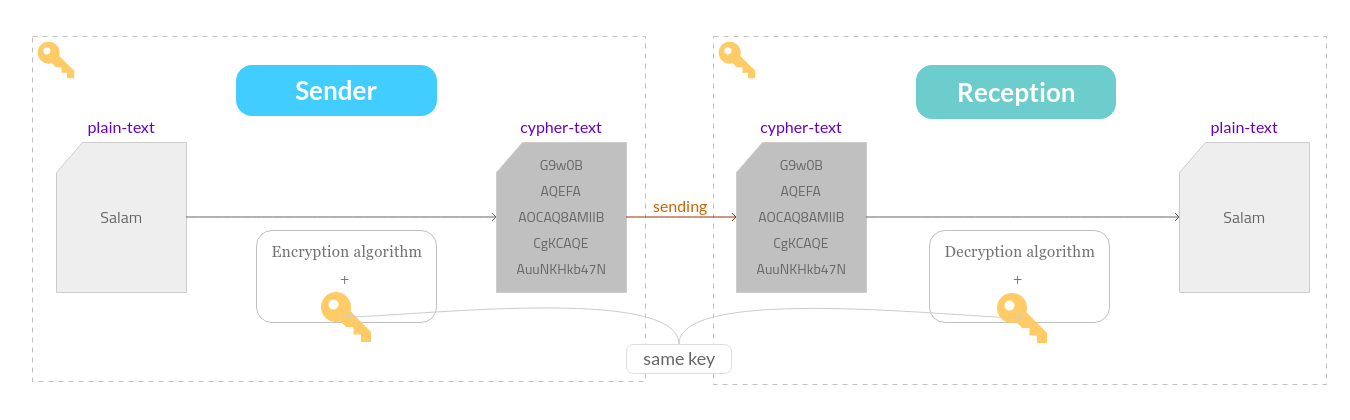
Example:
Hussain needs to send a private message to Omar. imagine the copy command cp is publicly accessible so it can't be used to transfer private info.
ls
# output: hussain  omar

cd hussain
# generate symmetric-key
openssl rand 128 -base64 -out symmetric.key
# Hussain's private-message
echo '#PalestinianLivesMatter' > plain-text.txt
# encrypt Hussain's private-message
openssl enc -base64 -in plain-text.txt -out cipher-text.crypt -aes256 -k symmetric.key

# --- here Hussain has these files
cat plain-text.txt        # plain text
# output: #PalestinianLivesMatter
cat symmetric.key         # key
# output: g7RdN9JtCP3zLMHBNJKlEJnsbdsb9Ayk.....
cat cipher-text.crypt     # cipher text
# output: U2FsdGVkX1+AUlwXpy1XfBrsje68Lfx08biA7qulVNh/YR6WcfvwA0usJz+0m5BG

# --- now lets send the encrypted message to omar:
cp cipher-text.crypt ../omar
Notice that Omar somehow - offline - will receive the key from Hussain. now lets read the message from Omar side.
cd ../omar
ls
# output: cipher-text.crypt  symmetric.key

# decrypt Hussain's private message
openssl enc -d -base64 -in cipher-text.crypt -out plain-text.txt -aes256 -k symmetric.key

# --- now omar can read the received message
cat plain-text.txt
# output: #PalestinianLivesMatter
the main problem with these algorithms is how to securely share the key with both ends. Asymmetric-key algorithms were introduced to solve this problem.
2- Asymmetric-key Algorithms
Here we use mathematically related keys:
-
public-key: available to anyone to encrypt and send a message. -
private-key: must be secret and will be used by the recipient to decrypt the message.
Each side (sender & reception) will have his own key pair (public and private). data that has been encrypted by one key can be decrypted by the different unrelated key.
It must be very hard to guess the private key based on knowing the public key.
There are several mathematical algorithms used to produce the public and private keys like:
- Rivest-Shamir-Adelman
RSA - Digital Signature Standard
DSS
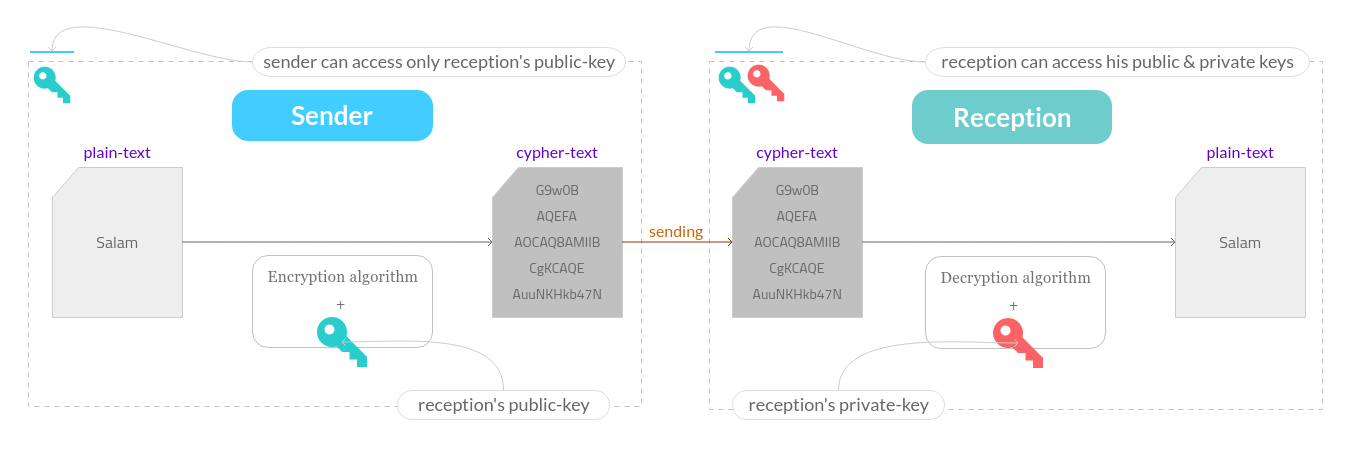
Example:
Hussain needs to send a private message to Omar. imagine the copy command cp is publicly accessible so it can't be used to transfer private info.
ls
# output: hussain  omar

cd omar
# generate private and public keys
openssl genpkey -algorithm RSA -out private-key.pem
openssl rsa -pubout -in private-key.pem -out public-key.pem

# --- here omar has these files
cat private-key.pem    # private key
# output:
# -----BEGIN PRIVATE KEY-----
# MIIEvgIBADANBgkqhkiG9w0BAQEFAASCBKgwggSkAgEAAoIB.....
# -----END PRIVATE KEY-----

cat public-key.pem     # public key
# output:
# -----BEGIN PUBLIC KEY-----
# MIIBIjANBgkqhkiG9w0BAQEFAAOCAQ8AMIIBCgKCAQEAuuNK.....
# -----END PUBLIC KEY-----

# --- now lets send the public-key to hussain:
cp public-key.pem ../hussain
Notice that Omar sent his public-key to Hussain so he can encrpt the private message.
cd ../hussain

ls
# output: public-key.pem

# Hussain's private message
echo '#PalestinianLivesMatter' > plain-text.txt

# encrypt Hussain's private message
openssl rsautl -encrypt -in plain-text.txt -out cipher-text.crypt -inkey public-key.pem

# --- here Hussain has these files
ls
# output:
# cipher-text.crypt    # cipher text
# plain-text.txt       # plain text
# public-key.pem       # omar's public key

# --- now lets send the encrypted message to omar:
cp cipher-text.crypt ../omar
Omar is going to use his private key to decrypt the private message
cd ../omar
ls
# output:
# cipher-text.crypt    # cipher text
# private-key.pem      # omar's private text
# public-key.pem       # omar's public key

# decrypt Hussain's private message
openssl rsautl -decrypt -inkey private-key.pem -in cipher-text.crypt -out plain-text.txt

# --- now omar can read the received message
cat plain-text.txt
# output: #PalestinianLivesMatter
If Hussain wants to receive a message from Omar he should generate his own private/public keys and repeat the previous steps with Omar.
The problem we have tried to solve so far is sending a private message to a specific reception and nobody else can read the message.
Digital Signature
Now we need to discuss another problem "the reception needs to make sure the message has been sent by the sender himself (not someone else claims to be the sender)".
Hash function
An algorithm that maps data of arbitrary length to data of a fixed length. and it's difficult to invert the output. values returned by a hash function are called
hash values,hash codes,digests, orhashes.one important use of a hash function is in the computation of a digital signature.
This diagram will help us to understand the flow of digitally signing a document:
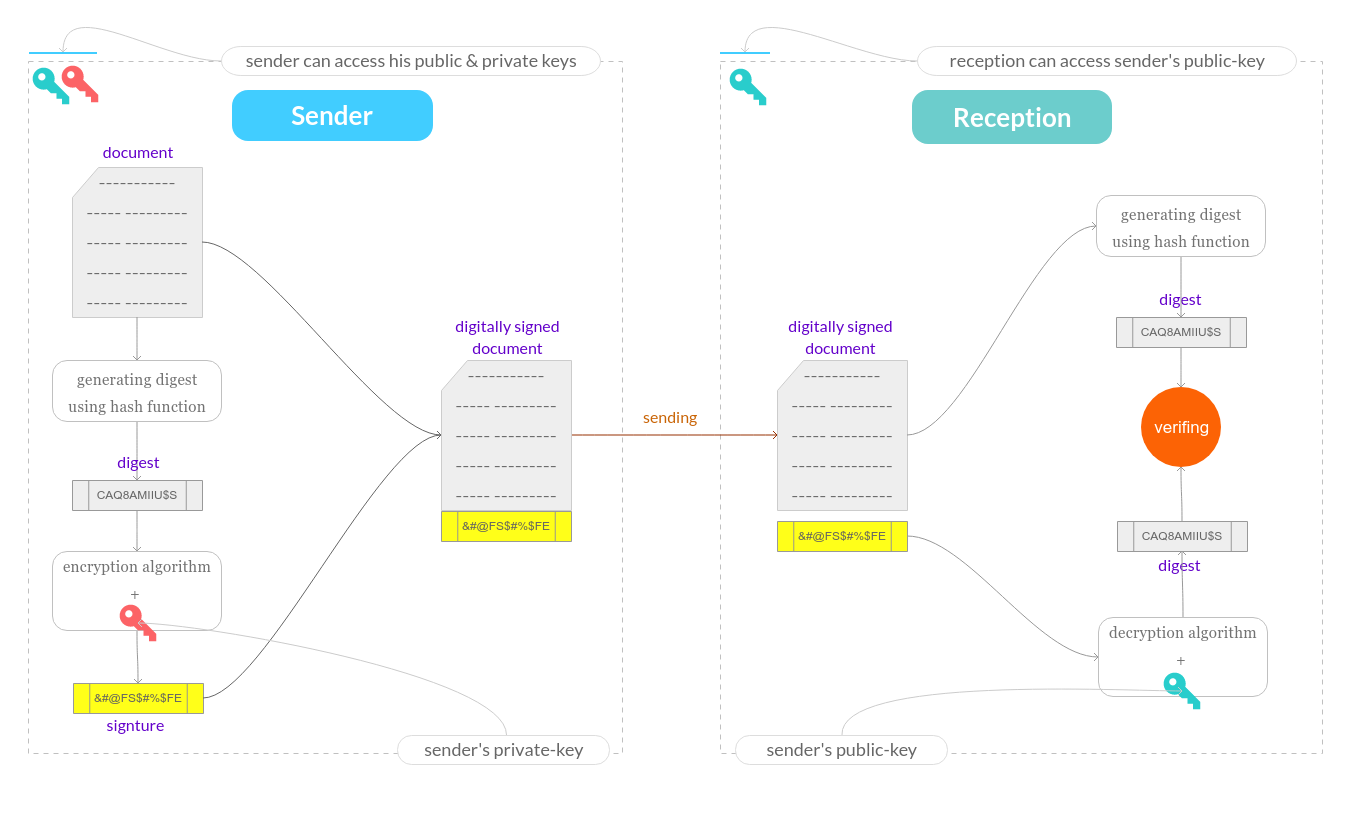
Note that:
- the input of the hash function is the "document" - data of arbitrary length - and the output is the "digest" - data of a fixed length -.
- The reason for encrypting the "hash" instead of the entire message or document is to save time as "hash" is usually much shorter.
- in the
verifyingstep, if the decrypted digest matches the computed hash of the document, it proves the data is sent by the sender (private-key owner) without any change.
Example:
The Leader needs to send a message to his team Members. and he needs to be sure that no one else can claim to be the Leader.
ls
# output: leader  members

cd leader
# leader generates his private and public keys
openssl genpkey -algorithm RSA -out private-key.pem
openssl rsa -pubout -in private-key.pem -out public-key.pem

# leader write up the document
echo 'document content...' > document.txt

# leader generate the document digest
openssl dgst -sha256 document.txt > document.dgst

# leader generates the document signature
openssl rsautl -sign -inkey private-key.pem -keyform PEM -in document.dgst > document.sign

# --- here the leader has these files
ls
# output:
# private-key.pem    # private key
# public-key.pem     # public key
# document.txt       # leader's document
# document.dgst      # the document digest
# document.sign      # the document signature

# --- now lets send the public-key and the signed document (document.txt + document.sign) to the members:
cp public-key.pem ../members
cp document.txt ../members
cp document.sign ../members
Now members need to make sure the document was sent by the leader himself.
cd ../members
ls
# output:
# public-key.pem     # public key
# document.txt       # leader's document
# document.sign      # the document signature

# members decrypt the document signature
openssl rsautl -verify -inkey public-key.pem -pubin -keyform PEM -in document.sign -out document.dgst_decrypted

# members generate the document digest
openssl dgst -sha256 document.txt > document.dgst_generated

# members verify the document signature
diff -s document.dgst_decrypted document.dgst_generated
# output:
# Files document.dgst_decrypted and document.dgst_generated are identical
Okay, after understanding how digital signature works, I think it's easy now to understand the Wiki definition:
A digital signature is a mathematical scheme for verifying the authenticity of digital messages or documents.
The upcoming sections might be difficult but I'll try to simplify them as much as I can, you better get a cup of coffee and come back 🏃.
Digital Certificates, Certificate Authorities CA, and Public Key Infrastructure PKI
In the real world, a certificate can be considered as an identity card issued to the person such as a driving license or passport to prove their identity.
A digital certificate / public key certificate / identity certificate does the same thing in the digital world. but it can be issued to computers, software packages, or any entity that needs to prove identity. it's a digitally signed document that binds together a public key with an owner's identity.
Public Key Infrastructure PKI is a framework that creates a secure network environment through issuing and governing these digital certificates.
PKI introduces a trusted third party ❬certificate authorities❭ to make decisions about assigning identities to the digital certificates.
The most known use case that exist for PKI is SSL/TLS certificates to secure web browsing communication.
Anyone can generate and sign a new digital certificate. However, that digital certificate isn’t considered valid unless it has been signed by a trusted CA.
In order for this framework to work, all operating systems and most web browsers ship with a set of trusted CAs. Here you can see the list of trusted certificate authorities in the Mozilla Firefox browser. Firefox will not trust any digital certificate except the ones that have been signed directly or indirectly by this list.
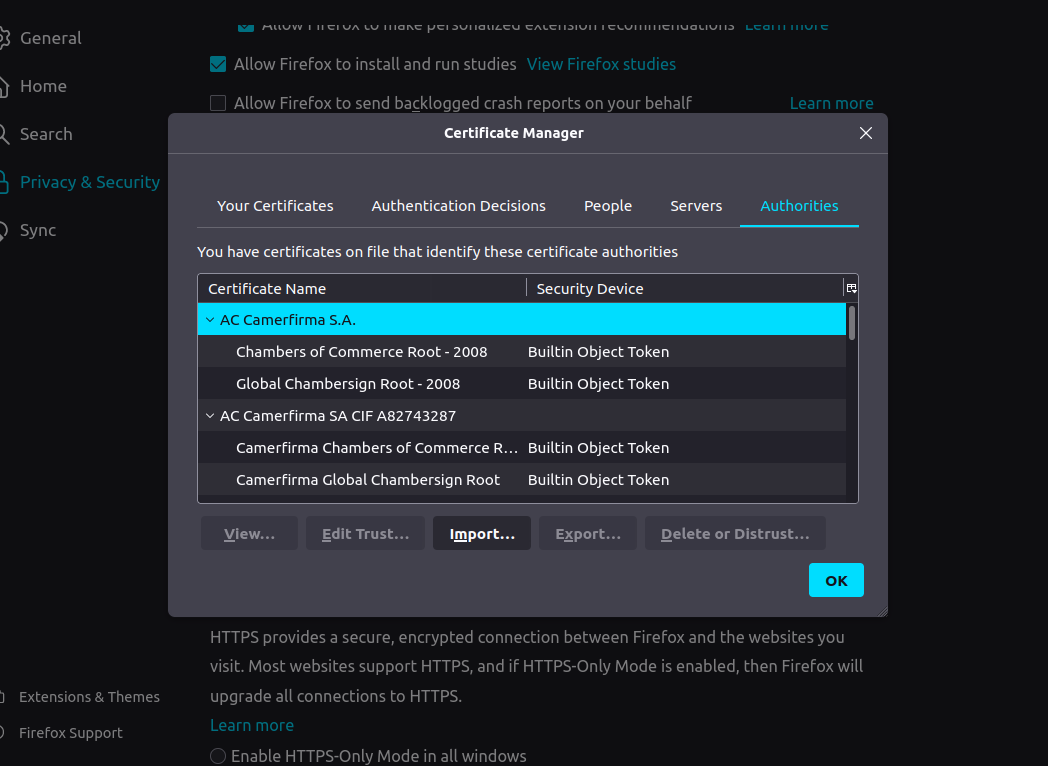
we can obtain a digital certificate by:
- producing it by ourselves and it called
self-signed certificates. of course it, won't be trusted by most browsers, operating systems, ... - sending a certificate signing request
CSRto a certification authorityCA, and they will generate and sign a digital certificate for us. usually, we pay money to theCAto sign our digital certificate.
Notice that, when we say the trusted CA will sign our digital certificate, technically we mean the CA will use its private key to generate a digital signature and associate it with the digital certificate. and any browse/os/.. can verify the digital signature of this digital certificate using the public key of the CA.
An operating system or web browser may alert the user when loading software or a website whose digital certificate can't be verified from a trusted
CA.
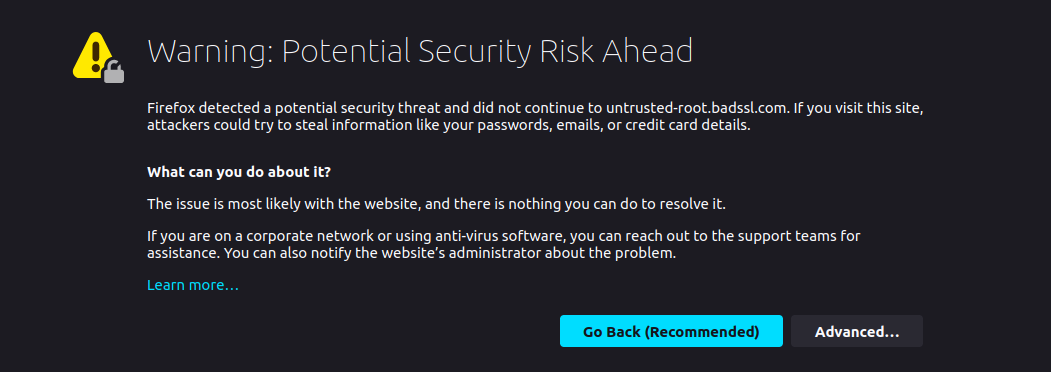
Depending on the certificate type, it can be used as a credential for websites, client authentication, code signing, document signing, or more.
Anyone having a valid digital certificate can:
- verify the entity presenting the digital certificate is what it claims to be.
- trust that the content of the certificate has not been altered since it was initially generated.
- use the certificate's public key to encrypt a message that can only be decrypted with the associated private key.
Chain of Trust
Me, You, Hussain, and Omar are traveling in the desert. unfortunately, we only have one bottle of water. ❬You are trusting me❭ and ❬Hussain is trusting Omar❭. Omar told us he will keep the bottle with him:
- if I trust Hussain who trusts Omar, you will be Ok with that.
- Chain of Trust: You ⇒ Me ⇒ Hussain ⇒ Omar
- if I don't trust Hussain and subsequently don't trust Omar, you will disagree with that.
- Chain of Trust: You ⇒ Me ⇏ Hussain ⇒ Omar
This is the whole idea of the chain of trust. When we try to validate a digital certificate we compare the digital certificate issuer with the list of our trusted CAs. if a match wasn't found, we will check to see if the digital certificate of the issuing CA was issued by a trusted CA, and continues until the end of the certificate chain. if we can’t chain the certificate back to one of our trusted CAs, we won’t trust that digital certificate.
don't lose your mind 🤕
We can say that A chain of trust is a list of certificates, usually starting with an ❬end-entity certificate❭, followed by one or more ❬intermediate certificates❭, the last certificate in the list called ❬root certificate❭.
you may see this certificate hierarchy in the browser before:
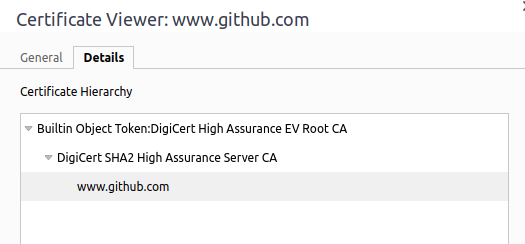
- the browser has its own list of trusted
CAs. - the server responds to the browser with:
- ❬end-entity certificate❭ "www,github.com".
- ❬intermediate certificate❭ "DigiCert SHA2 High Assurance Server CA".
- the browser will check if the ❬end-entity certificate❭ "www,github.com" was issued by a trusted
CA - if not, the browser will check if the ❬intermediate certificate❭ "DigiCert SHA2 High Assurance Server CA" was issued by a trusted
CA. and yes the browser will find the issuer matches a record in its own list of trustedCAs which is the ❬root certificate❭ "Builtin Object Token:DigiCert High Assurance EV Root CA". - the browser can verify the digital signature of the ❬intermediate certificate❭ "DigiCert SHA2 High Assurance Server CA" by using the public-key of the ❬root certificate❭ "Builtin Object Token:DigiCert High Assurance EV Root CA"
- the browser can verify the digital signature of the ❬end-entity certificate❭ "github.com" by using the public-key of the ❬intermediate certificate❭ "DigiCert SHA2 High Assurance Server CA"
PKI relies on the idea of trusted CAs. If a CA is compromised, then the whole PKI is compromised and new certificates need to be issued. This is why CAs should follow some security practices. If you have time you can read about this Horror Story.
One of these security practices is minimizing the potential exposure of a root certificate to attackers. so, usually CAs don't issue digital certificates directly from the root certificate but instead via one or more of their intermediate certificates.
HTTPS, SSL, TLS, and SSL Certificates
HTTPS is a combination of HTTP (HyperText Transfer Protocol) + TLS (Transport Layer Security).
- HTTP defines the rules to build the request/response messages that will be exchanged between the client and the server.
- TLS defines the rules to securely send these messages.
You can think of TLS as a secure layer under HTTP. so it creates a secure connection before exchanging any information.
SSL vs TLS
The first released version of the SSL protocol is SSL 2.0 in 1995, then SSL 3.0, then both have been deprecated. after that TLS 1.0 - a more secure protocol - has been released, and now the most recent version is TLS 1.3 which released in 2018.
Until now, The industry tends to stick with SSL term than TLS. also we still use the term SSL certificates and not TLS certificates.
SSL/TLS certificates
Usually, SSL/TLS certificates are issued to web servers to verify their identities.
When a web server proves his identity with SSL/TLS certificates:
- a client can verify he is communicating with the server he expects and not a man-in-the-middle.
- client and server encrypt the exchanged data between both of them.
SSL/TLS certificates contain:
- The subject domain name/organization.
- The name of the issuing
CA. - Issue date / Expiry date.
- The public key (the private key will be kept in the webserver).
- The digital signature by the
CA. - ...
The short story
>>> A browser wants to establish a connection with https://github.com
- the browser requests
https://github.com. - the server responds with its SSL/TLS certificate.
- the browser verifies the SSL/TLS certificate using its list of trusted
CAs. this step demonstrates the browser communicates with the certificate's subject "github.com" and not a man-in-the-middle. - The browser uses the public-key of the SSL/TLS certificate to encrypt a random symmetric encryption key and sends it to the server with the encrypted URL required as well as other encrypted HTTP data.
- The web server decrypts the symmetric encryption key using its private key and uses the symmetric key to decrypt the URL and HTTP data.
- The web server sends back the requested html document and HTTP data encrypted with the symmetric key.
- The browser decrypts the HTTP data and html document using the symmetric key and displays the information.
of course, there are more details, and what actually happening could be a little different.
TLS/SSL certificate forms
SSL certificate has several forms - you might notice a different prices for different forms while purchasing a certificate -:
-
Domain Validated
DV:- ideal for normal websites.
- cheaper and usually issued in minutes.
-
Organization Validated
OV:- the buyer will be asked to submit a few documents.
- ideal for organizations selling products online through e-commerce.
- take an hour or few days to be issued.
- more expensive.
-
Extended Validation
EV- offers full business authentication.
- required by larger organizations dealing with highly sensitive information.
- very expensive.
- can take a few days or few weeks to be issued.
Summary
Remember, the world of web security is rapidly growing every day. this post wasn't written by a web security professional guy, I was searching about most of its concepts while writing it. so this is not a reference or something like that, you can think of it as كلمتين على قهوة بلدي.
For further reads, check out these links:
- http://www.moserware.com/2009/06/first-few-milliseconds-of-https.html
- https://github.com/ychaouche/SSL-diagram
See you in the next post in-sha-Allah. salam.