2020-11-30
🤿 Diving Deeper Into Real Time Applications
Actually, the main purpose of starting this blog is to improve my English writing skills. also for the last 6 months, I had many tasks in my work that required me to deal with real-time applications like building a simple chat, showing real-time statistics/notifications in a dashboard...etc.
So in this series, I'll try to cover some ideas, approaches, technologies, and code examples around this concept. I don't have much experience so there are no headlines. I will just start the journey and let's find out together how much we can get deeper.
will be so glad for your help in fixing a typo, introducing a better way to construct a phrase, or giving me some feedback about my English writing.
Now, I'm writing this post while enjoying listening to this calm and peaceful voice ... happy reading 😊
Overview:
The main concept we revolve around here is delivering data from the server to the client whenever some data is changed in the server. we have 2 approaches to achieve that, client pull and server push.
When the client is asking the server for data, this is called client pull.
The reverse, when the transmission of data is initiated by the server, this is called server push.
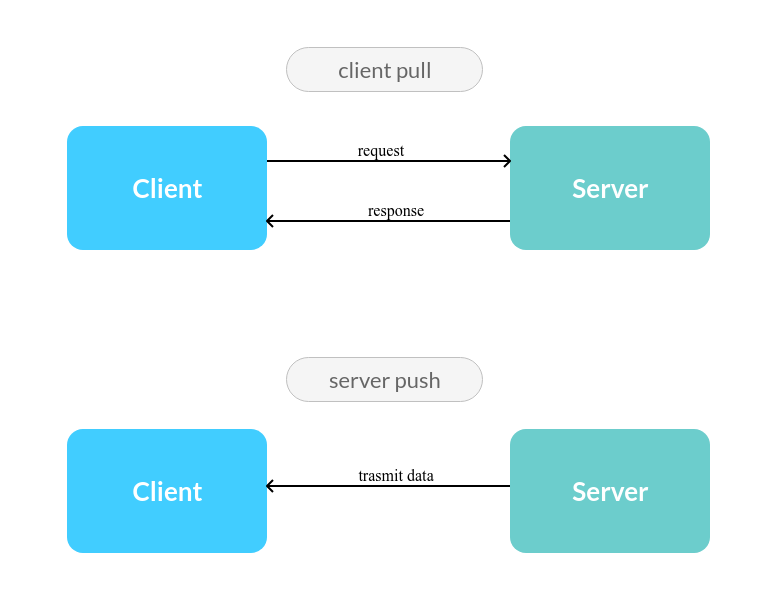
To implement these 2 approaches we have some techniques:
- short polling (client pull)
- long polling (client pull)
- server-sent events
SSE(server push) - web-sockets (server push)
Short Polling
In this technique, the client constantly asking the server for new data. we can think about it like this conversation between the client & server:
> Client: any updates?
- Server: yes, the restaurant is preparing your food
> Client: any updates?
- Server: no
> Client: any updates?
- Server: no
> Client: any updates?
- Server: yes, your food is in-delivery now
It's obvious that this technique wastes the server resources.
- HTTP headers for each incoming request must be parsed.
- database query must be performed.
- a response must be generated and delivered to the client.
this process will keep running multiple times for every client. so it's a bad practice for something like chat application.
However, The previous conversation could be a good example of using this technique. think about it! after a regular user orders his meal from an ordering food app, a page should appear to him indicating the status of his order like:
- pending in the restaurant.
- order canceled (maybe)
- preparing by the restaurant (15 min).
- in-delivery (20 min).
- delivered.
On this page, usually no user spends 35 min watching the status of his order. of course he may keep the page opened but it's ok for some delay - the different time between changing the order status value in the server and showing it in the page - unlike chat messaging for example. so Instead of thinking of a complicated solution we can use the Short Polling technique and make the period between requests is 30 seconds or so.
Real Example:
Now we will write a very simple example of this technique. let's run this script on the server-side.
<?php

/**
 * this is a mock to a function which perform a query and do some
 * calculations to get the top seller today
 *
 * @return string
 */
function getTopSellerToday() {
    $sellers = ['Ahmed', 'Yasser', 'Ibrahim', 'Hussain', 'Hassan'];
    return $sellers[array_rand($sellers)];
}

header('Content-type: application/json');
header('Access-Control-Allow-Origin: *');
header('Access-Control-Allow-Headers: X-Requested-With, content-type');

echo json_encode([
    'top_seller' => getTopSellerToday()
]);

# response example: {"top_seller":"Hassan"}
we can run this script using the command below:
php -S 127.0.0.1:8000
and for the client we can write this script.
<!DOCTYPE html>
<html>

<head>
  <title>Dashboard</title>
  <link rel="stylesheet" href="style.css">
</head>

<body>
  <div>
    <h2>Top Seller</h2>
    <p id="top-seller"></p>
  </div>

  <script>
    function fetchTopSeller() {
      const xhttp = new XMLHttpRequest();
      xhttp.onreadystatechange = function () {
        if (this.readyState != 4) return;

        // --- success
        if (this.status == 200) {
          const response = JSON.parse(xhttp.responseText);
          document.getElementById('top-seller').innerHTML = response.top_seller;

          // here we will fetch the top seller again after 3 sec
          setTimeout(function () { vue.fetchTopSeller(); }, 3000);
        }
        // --- something went wrong
        else {
          window.alert('error');
        }
      }

      const query = this.topSeller ? `?top_seller=${this.topSeller}` : '';
      xhttp.open('GET', `http://127.0.0.1:8000/server.php${query}`, true);
      xhttp.send();
    }

    fetchTopSeller();
  </script>
</body>

</html>
Notice how we used the setTimeout function in the success part of the fetchTopSeller() method.
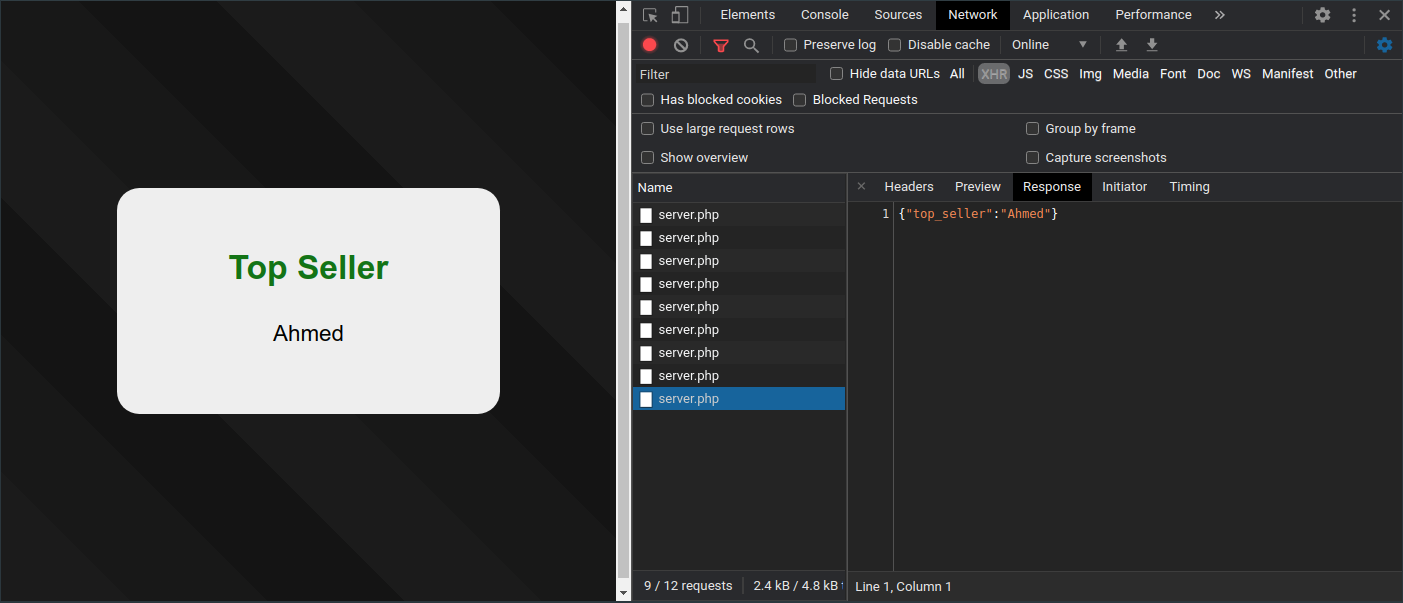
and here is how the request keeps going to server.php every 3 seconds. now the data seem to be real-time.
Long Polling
We can think of this technique as a fork of short polling. remember the previous conversation between the client & server? this technique will try to eliminate the empty responses Server: no and also reduce the delay time.
The server holds the client's connection and waits for some information to be available. once the information becomes available (or after the request timeout) a response will be returned to the client.
Real Example:
We will make some modifications to the previous example of the short polling technique. first, let's start with the code in the server.
<?php
# ....

$clientTopSeller = $_GET['top_seller'] ?? null;

do {
    $serverTopSeller = getTopSellerToday();
    if ($clientTopSeller != $serverTopSeller) break;
    sleep(1);
} while (true);

echo json_encode([
    'top_seller' => $serverTopSeller
]);

# response example: {"top_seller":"Hassan"}
Here the server is expecting the client's top_seller value. and will hold the connection until the $serverTopSeller value will differ from the client value. notice how the server is calling getTopSellerToday() function each second as long as the client & server values are the same.
Now let's figure out how could we modify the client code.
// ...
  <script>
  var topSeller;

  function fetchTopSeller() {
    const xhttp = new XMLHttpRequest();
    xhttp.onreadystatechange = function () {
      if (this.readyState != 4) return;

      // --- success
      if (this.status == 200) {
        const response = JSON.parse(xhttp.responseText);
        topSeller = response.top_seller;
        document.getElementById('top-seller').innerHTML = topSeller;
      }
      // --- fetch the top seller again in case (success|request-timeout)
      if ([200, 500].includes(this.status)) {
        fetchTopSeller();
      }
      // --- something went wrong
      else {
        window.alert('error');
      }
    }

    const query = topSeller ? `?top_seller=${topSeller}` : '';
    xhttp.open('GET', `http://127.0.0.1:8000/server.php${query}`, true);
    xhttp.send();
  }

  fetchTopSeller();
  </script>
// ...
Notice how we call the fetchTopSeller() immediately after getting the response from the server. no setTimeout() anymore. of course this may differ depending on your app.
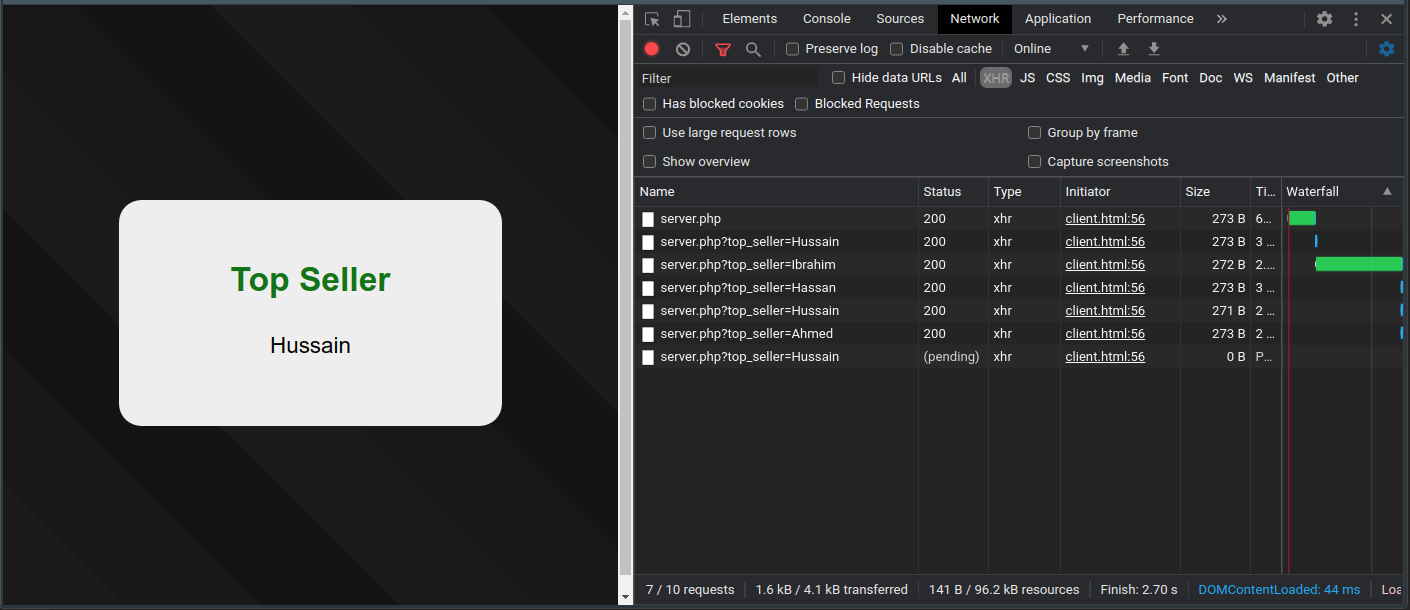
This is the chrome's network tap, and you can see how the last request is pending. it's obvious that at this moment the client's top_seller value equals to the server value which is Hussain. and now the server is holding the connection by using sleep(1) method until its value differs from the client value.
I really liked this technique the first time I implemented it.
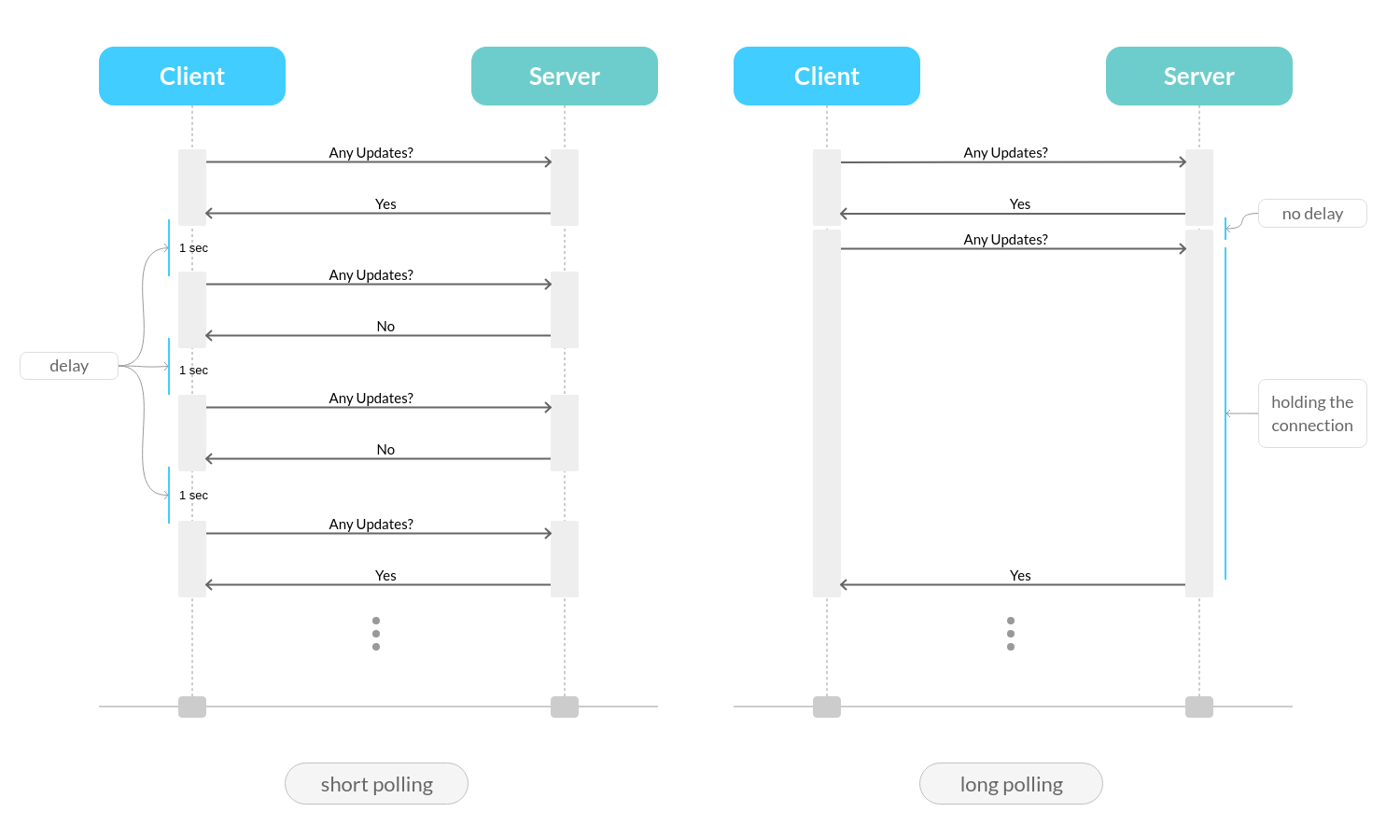
Before moving forward to SSE, this diagram will help us to remember the difference between short and long polling.
Server-Sent Events SSE
This technique is very interesting although it's not popular. we still using the traditional HTTP.
Firstly the client sends a single request to the server. after that, the server can keep pushing data (sending events) to the client. on the other hand, the client needs to handle the received data (listening to server events).
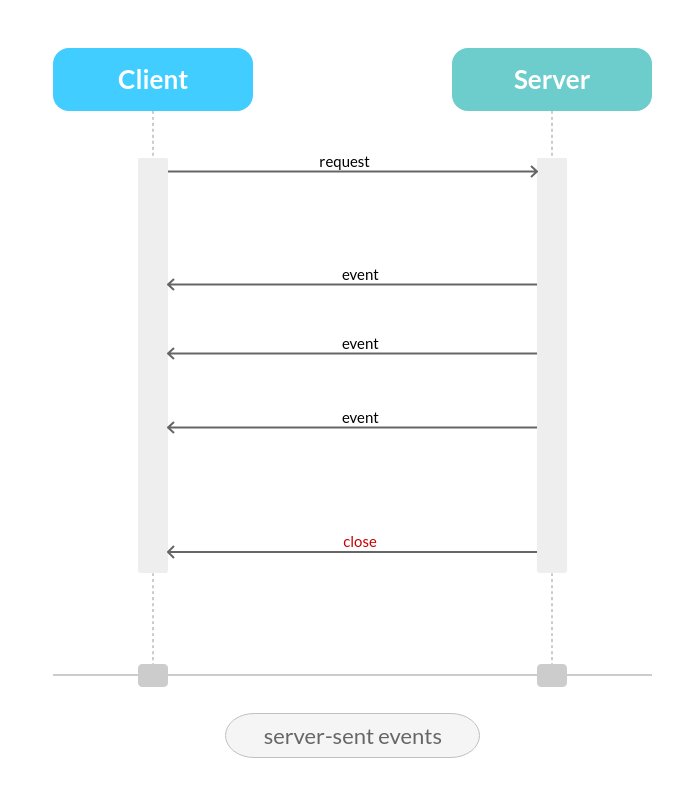
Note that the client can’t send messages to the server, only receiving data.
Real Example:
We will continue modifying our example in the previous techniques. let's start with the code on the server.
<?php

// ...

header("Cache-Control: no-cache");
header("Content-Type: text/event-stream");
header('Access-Control-Allow-Origin: *');
header('Access-Control-Allow-Headers: X-Requested-With, content-type');

do {
    $oldTopSeller = $newTopSeller ?? null;
    $newTopSeller = getTopSellerToday();

    if ($newTopSeller != $oldTopSeller) {
        echo "event: newTopSeller\n";
        echo "data: " . json_encode(['top_seller' => $newTopSeller]) . "\n\n";

        if (ob_get_length()) {
            ob_end_flush();
            flush();
        }
    }

    if (connection_aborted()) break;

    sleep(1);
}
while (true);

/*
 * # message example:
 * event: newTopSeller
 * data: {"top_seller":"Hassan"}
 */
Notice how the server responds with the header Content-Type: text/event-stream so the client will be prepared for listening to the incoming events.
Also, notice that each notification/event the server send is consists of 2 lines (could be more);
- event: this is the event name and we can listen to it from the browser.
- data: the actual message.
Now let's figure out how could we modify the client code. here we are also only interested in the fetchTopSeller method.
// ...
  <script>
    function fetchTopSeller() {
      const eventSource = new EventSource('http://127.0.0.1:8000/server.php');
      eventSource.addEventListener("newTopSeller", function (event) {
        const response = JSON.parse(event.data);
        document.getElementById('top-seller').innerHTML = response.top_seller;
      });
    }

    fetchTopSeller();
  </script>
// ...
We are listening to the event newTopSeller which we just sent from the server. then we show our top seller. so simple, right?
Note that, If the connection drops, the EventSource fires an error event and automatically tries to reconnect.
Here is how SSE looks like in Chrome's network tab. notice inside the EventStream tab we can see the Type which is the event that we are listening to.
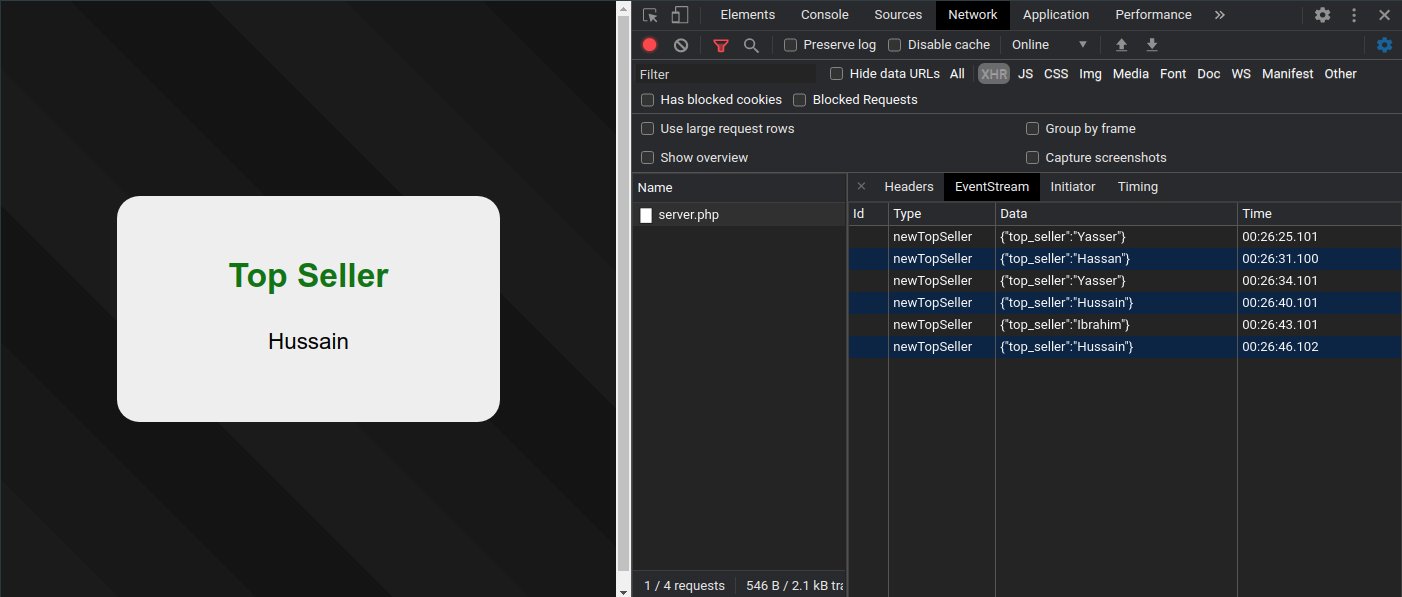
Before moving forward to web-socket you need to know that SSE is not supported by IE. and also the maximum number of the opened connections for a single domain in the browser - for all tabs - is 6.
WebSocket Protocol
At some point in the history of the Internet, some organizations showed up called SDOs 'Standards Development Organizations'. You likely heard about some of them like W3C, ECMA TC39, IETF...
We might say the main role of these organizations is to describe in a very detailed and formal way some aspects/technologies of the world wide web.
Some examples of the documents/specifications produced by SDOs are:
- Hypertext Transfer Protocol -- HTTP/1.1 by
IETF. - Hypertext Markup Language (HTML) the 5th major revision by
w3c.
Usually, the documents developed by these organizations are not very useful for learning how to use the technologies they describe, however they are intended to be used by software engineers to implement these technologies.
In December 2011 IETF finalized a document that talked about The WebSocket Protocol. In this section, we will try to understand the main idea this document is introducing.
Notice that
HTTP&WebSocketprotocols are located at layer 7 - Application Layer - in the OSI model and depends on TCP protocol at layer 4 - Transport Layer -.
Whenever a computer wants to send data to another computer over TCP, they both need to make 3 steps:
- establish a connection using a three-way handshake:
- the first computer sends a
SYNpacket -synchronize?- - the second computer responds with
ACK&SYNpackets -acknowledge ... synchronize?- - the first computer responds with
ACKpacket -acknowledge-
- the first computer sends a
- one computer sends packets of data and the recipient computer acknowledges what he received.
- close the connection.
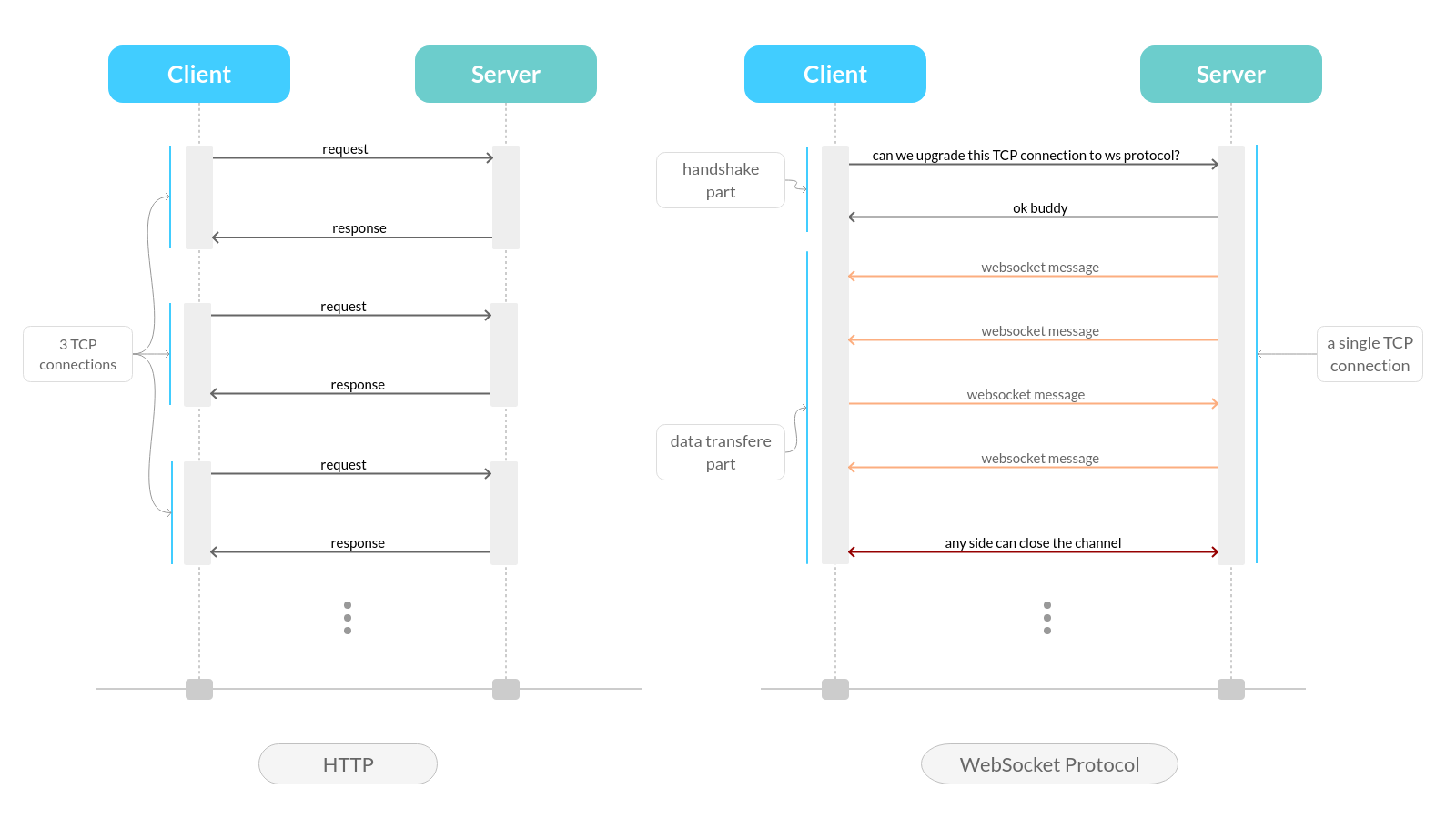
Now imagine we have a server that serves a client chat application which is built using the short polling technique. If we have 1 client communicating with the server then each HTTP request is considered as a different TCP connection. And If we have multiple clients then the server needs to handle multiple TCP connections for every single client. of course this is high overhead.
What web-socket protocol is introduced to use only a single TCP connection for every single client. and data can be sent in both directions between the client & server.
WebSocket Protocol consists of 2 parts:
- handshake:
- a client sends a traditional HTTP request with some specific headers like
Upgrade: WebSocket,Connection: Upgrade. - if the server supports the WebSocket Protocol, it will replay with some headers and completes the handshake.
- a client sends a traditional HTTP request with some specific headers like
- data transfer: if the handshake is successful, (the client & server have agreed to use the existing TCP connection as a WebSocket connection), each side can send messages whenever he wants.
This diagram will help us to remember the difference between the traditional HTTP and Websocket Protocol:
This is enough for now and in the future, we might dive deeper into this technique and write some code.
Summary:
We talked about different approaches and techniques. but at the end of this post, we need to remember that there is no an old bad technique & a new good one. we should pick the suitable solution for our situation.
In the future, we might talk about some concepts like:
- socket io
- socketo me
- diving deeper into web-sockets.
- WebRTC
- Firebase, FCM, pusher, one-signal
- Laravel-Websocket
see you soon in-sha-Allah. salam.